


| Resources for this article |
| Missed Call Text Back ROI Calculator |
| Missed Call Text Back Template Generator |
Want to know the dirty little secret that’s killing local businesses?
You’re literally handing customers to your competition… with every single ring of your phone.
I know that sounds crazy. But stick with me for a second, because what I’m about to share will probably make your stomach turn…
Missed Call Statistics: The Silent Killer of Local Businesses
Current Industry Response Rates
Here’s the truth: Right now, this very minute, local businesses like yours are MISSING 62% of incoming calls (on average). That’s not a typo. 62 freakin’ percent.
Think about that. More than 6 out of every 10 people trying to give you money are getting crickets when they call you.
And guess what they do next? Yep – they call your competitor.
Look, I’m not pulling these numbers out of thin air. The data’s actually worse than you might think…
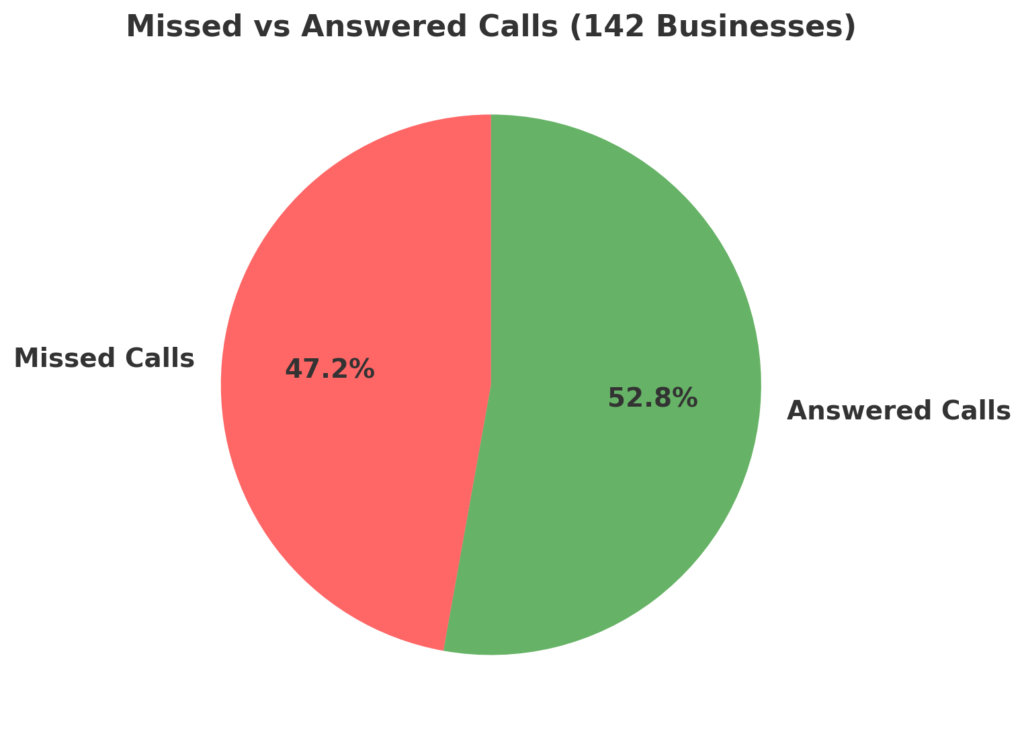
A recent study by TelePA Ltd tracked 142 businesses. Want to know how many missed their incoming calls?
67 of them. That’s almost HALF. Gone. Poof. Money left on the table.
But wait… It gets even more painful…
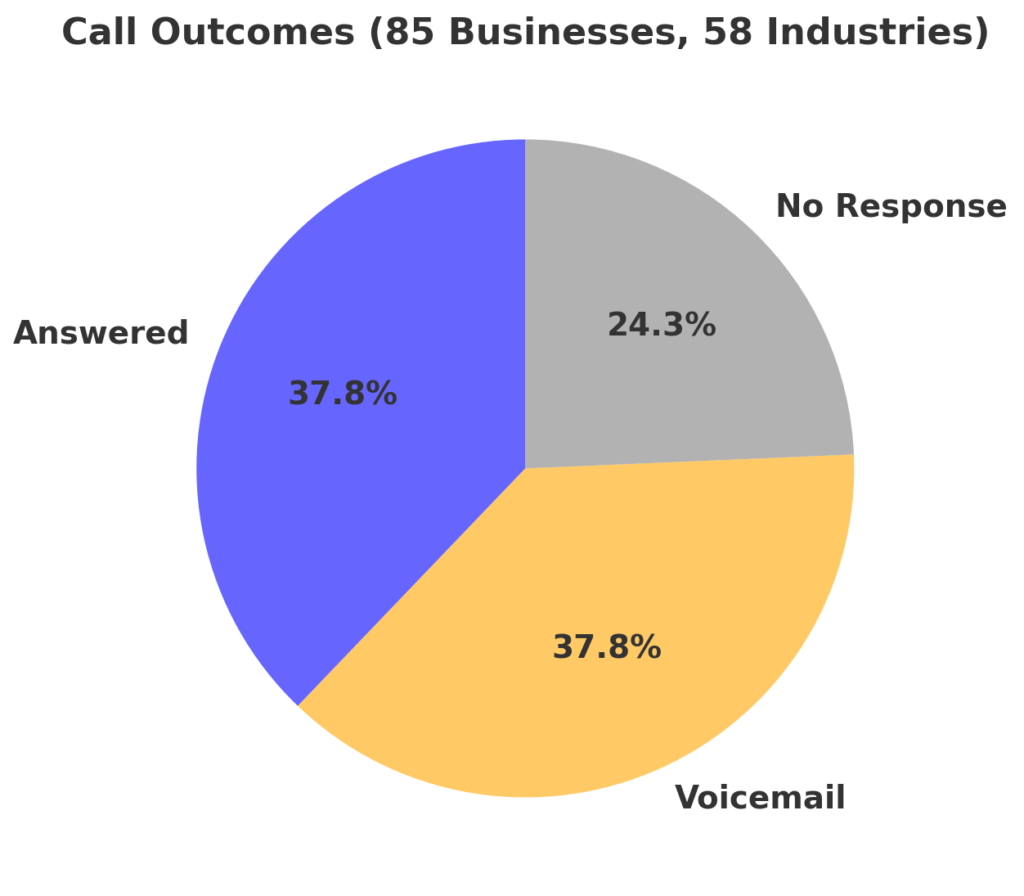
411 Locals did this fascinating (and kind of terrifying) study. They monitored 85 businesses across 58 industries for a full month. Here’s what they discovered:
- Only 37.8% of calls got answered (ouch)
- Another 37.8% hit voicemail (you know, that thing nobody likes using).
- And here’s the gut punch: 24.3% got absolutely nothing. No answer. No voicemail. Nada. Just dead air and probably a quick call to your competition.
Let that sink in for a second…
These people have their credit cards in hand, ready to book your services or buy your products, and they can’t even leave you a message.
Think about what YOU do when you call a business that doesn’t pick up. You go on to call the next business on that list right? In other words, you go on to call the next competitor… You do it. I do it. Everyone does it.
Good for your competitors.
Not so good for you…
Local Business Call Management: The Numbers Don’t Lie
Now, I can hear you thinking: “Yeah, but what can I do? I can’t be everywhere at once.”
And you’re right. You can’t.
But what if I told you there’s a way to capture EVERY single one of those calls? Without:
- Hiring expensive office staff ($60k/year? No thanks)
- Being chained to your phone 24/7
- Paying for an overpriced answering service
The Hidden Cost of Missing Customer Calls
Let me shoot straight with you for a second…
Your phone rings maybe 20 times a week when you can’t grab it. (And we both know I’m being nice with that number, but let’s keep this simple.)
Quick math time – stick with me here: 20 missed calls per week = 80 people trying to give you money each month.
Now here’s where it gets sickly… even if only HALF of those folks actually needed your services right then (and c’mon, nobody calls a business just to chat about the weather) that’s 40 jobs or appointments straight-up vanishing.
At $200 a pop for example (and let’s be real, depending on your business, that could be way more)…
(Home service businesses like plumbers are probably upwards of $500)…
You’re watching EIGHT GRAND walk right out the door. Every. Single. Month.
Let that mess with your head for a second: $8,000. Monthly. Gone. Poof.
(If you’re doing that yearly math right now – yeah, that’s like $96,000 per year you’re basically gift-wrapping for your competition…)
And here’s what kills me… this isn’t happening because you’re not great at what you do. It’s not happening because your team isn’t skilled. It’s not because you’re not hustling hard enough.
It’s just because you haven’t set up one stupid simple automation that takes like 10 minutes to get running.
Keep reading I’m about to get to it.
After-Hours Missed Call Management
But first, here’s something most business owners (who offer after-hours services) don’t want to talk about…
After-hours inquiries are your golden opportunity. Whether it’s someone browsing online late at night planning their weekend projects, or someone with an urgent need who can’t wait until morning – these calls are worth their weight in gold.
You know what these calls have in common?
Two things:
- They’re often worth 2-3x your normal rate (hello premium pricing)
- After work hours they’re almost certainly going straight to voicemail
Think about it. When someone needs your service urgently, they’re not leaving voicemails. They’re not filling out your website contact form. They’re definitely not waiting around.
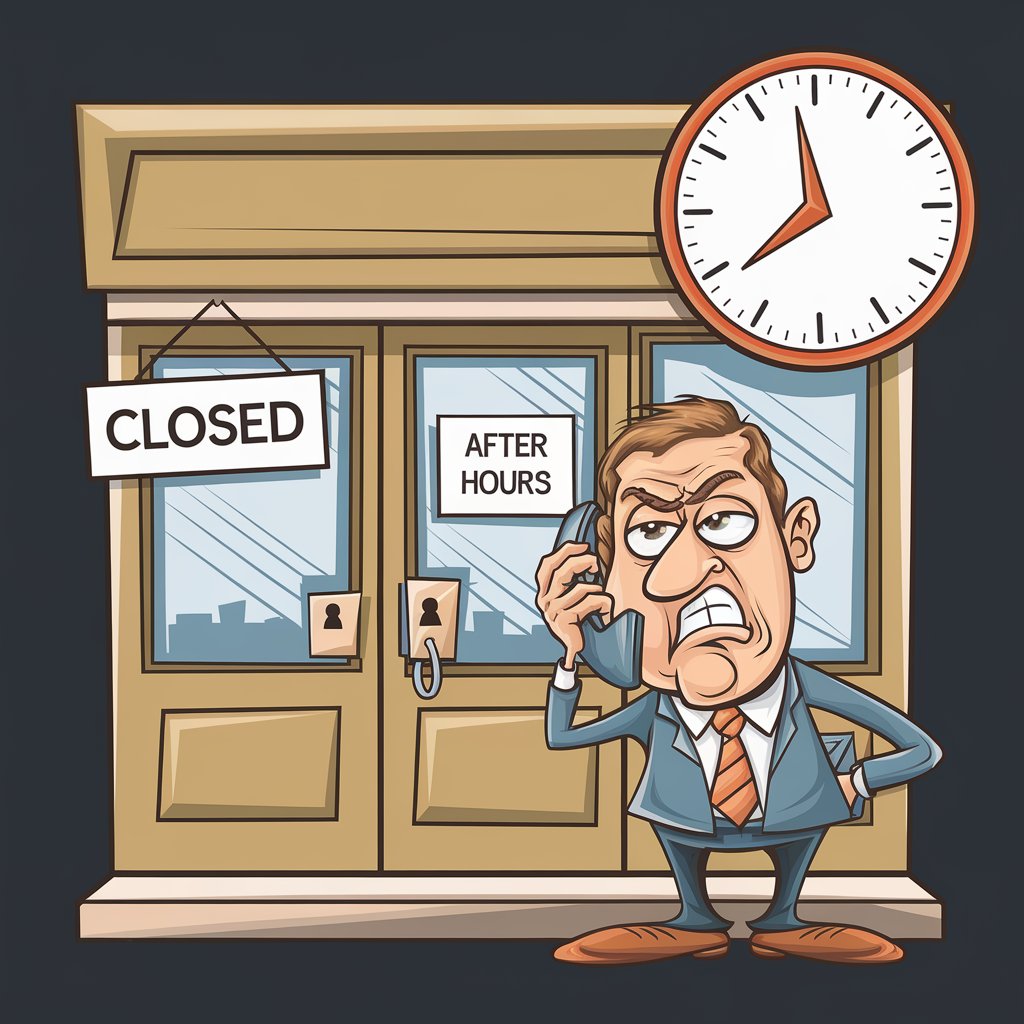
They’re frantically calling every business in town until someone, anyone, picks up the phone. Or at least responds.
And right now? That someone is your competitor.
“But wait,” I hear you saying, “I can’t sit by my phone all day waiting for calls!” – whether they’re an emergency or not.
And you’re absolutely right. You shouldn’t have to.
That’s where smart automation comes in. Not the complicated, tech-nightmare kind. I’m talking about the “set it up once and forget about it” kind that handles your missed calls like a charm.
Answering Service For Small Businesses (Without Hiring More Staff)
Introducing GoHighLevel – the BEST marketing & automation software for local businesses that’s changing the game.
Look, I know what you’re thinking… “Oh great, another software platform.”
But hang tight, because this is different. While GoHighLevel has over 300 features (crazy, right?), we’re going to focus on just ONE game-changing feature that’s printing money for local businesses:
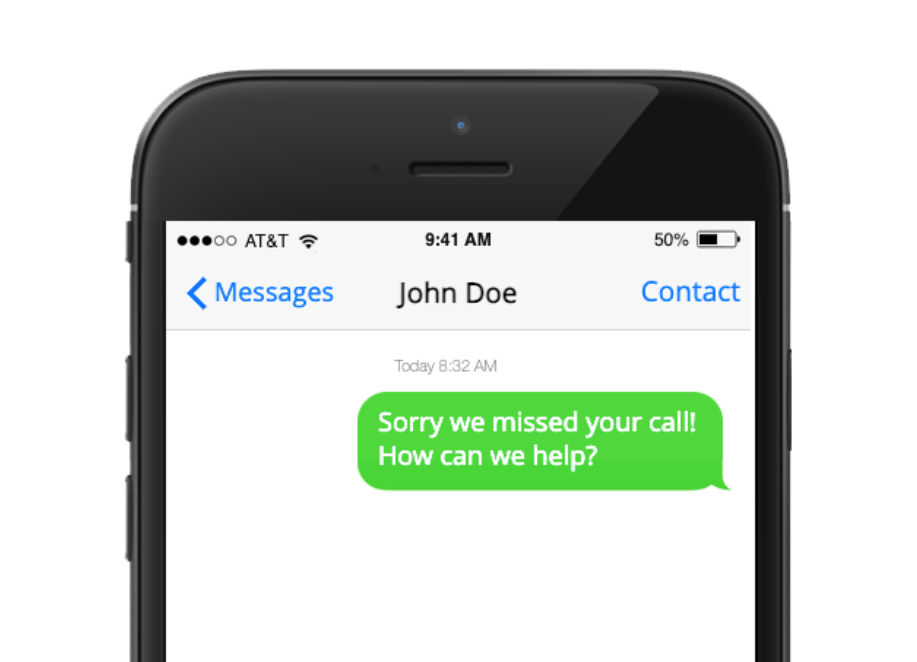
The Missed Call Text Back – it’s a simple automation that can be setup within 10 minutes or less and will respond to EVERY missed call with a text message within seconds and then turn that conversation into a booked appointment…
Now let me explain how, and why it’s so effective…
Here’s How It Works
Picture this: It’s the middle of your busy day. You’re with a client, focused on delivering your best service when your phone starts buzzing in your pocket.
The phone rings. And rings. And… you know the rest.
But instead of losing that customer to your competitor, something magical happens…
Within seconds of them hanging up, they get a text saying something like “Hey! This is [Your Business]. Sorry we missed your call! Can we help you via text or would you like a callback?” (The message can say whatever you want it to)
Here’s the beautiful part: People act differently when they get a text. They don’t expect an instant response like they do with calls. They’re cool waiting a little while until you finish up what you’re doing.
Just like that, you’ve kept them from calling the next business on their list.
But What About Your Office Staff?
Same deal. When they’re at lunch, in a meeting, or yeah… in the shitter (we’re all human), this system kicks in automatically.
Here’s what typically happens:
If it’s an emergency? They’ll shoot back a text like “HELP need [your service] ASAP!”
For example, if you’re a plumbing company “HELP burst pipe in basement!” No problem – you or your team can wrap up whatever you’re doing and call them right back. They’re not going anywhere because they know you’re on it.
If it’s not an emergency? Even better. They’ll usually text you their issue, and boom – you’ve got yourself a conversation started. Maybe they need a quote, or want to schedule something for next week. Either way, they’re talking to YOU, not your competition.
If they call after hours? You can set up a different automated message that sets proper expectations: “Thanks for calling! We’ve received your after-hours request. If this is urgent, please [insert your after-hours process]. For non-emergencies, we’ll respond first thing in the morning.”
Brilliant. You’ve just saved a metric buttload of business (yay).
How To Handle Missed Calls
Now here’s where it gets really interesting…
You’ve got two ways to handle this:
Option 1: Keep It Simple (Manual)
A caller doesn’t get through. The automated text message goes out. You get the text notifications and respond when you’re free. The customer stays engaged, and you haven’t lost them to the competition. Cost? Far less than a single service.
Option 2: Let AI Do The Heavy Lifting (Automated)
Yeah, you read that right. GoHighLevel’s AI can handle entire conversations for you. It books appointments, answers questions, and handles situations… all while you’re focused on actual client work or growing the business.
Here’s the crazy part about the AI – you can actually train it to become YOUR virtual mini-me. Feed it your business info, your pricing, how you talk to customers… and it starts handling conversations exactly like you would.
(That’s a whole other story though, and honestly? It deserves its own deep dive. I’ve probably already written an article on GoHighLevels AI Employee somewhere on this site. If not, it’s dropping any day now…)
Look, here’s the deal – I geek out about this stuff. Like, really geek out. And if you’re curious about the whole AI thing or GoHighLevel in general, I’m always down to chat about it. There’s a contact form floating around this page somewhere. Feel free to reach out.
Here’s The Bottom Line
When you don’t fix this problem, you’re basically sending customers gift-wrapped to your competition.
But when you do fix it…
You capture every potential customer. Convert missed calls into booked appointments. Build a reputation for reliability.
And the best part? It all happens on autopilot.
“But what if…” (Let’s Address The Elephant In The Room)
Look, I know what you’re thinking right now. I’ve heard all these objections before because *newsflash* I had the exact same ones when I first looked into this. Let’s tackle them head-on:
“Isn’t this going to be complicated to set up?” Nope. If you can use a smartphone, you can set this up. Seriously. It takes about 10 minutes, and most of that time is just deciding what you want your message to say.
“What if the system goes down?” Then you’re right back where you started – getting voicemails. But here’s the thing: GoHighLevel’s uptime is better than your cell phone service. They’re powering thousands of businesses. This isn’t some fly-by-night operation.
“What about the cost?” Let me be real with you… it’s most likely less than what you charge for a single service. Think about that – ONE job pays for it and then some. And we already talked about how it can save you $8k+ in missed opportunities every month.
“Do I need to be tech-savvy?” If you can set up your voicemail, you can set this up. It’s literally fill-in-the-blank simple.
Top Converting Missed Call Text Back Response Templates
Alright, let’s get into the good stuff. Here are some message templates that are crushing it right now:
For Regular Business Hours:
“Hey! Thanks for calling [Your Business]. Sorry we missed you – we’re helping another customer right now. Is this an emergency? Text back ‘YES’ if you need immediate help, or let us know what you need and we’ll get right back to you!”
Why this works:
- It’s friendly and professional
- Gives them a quick way to flag emergencies
- Shows you’re actually busy with customers (builds trust)
- Opens the door for conversation
For Quick Response Situations:
“Hi from [Your Business]! Missed your call just now. Would you like us to: 1) Call you right back, or 2) Help you via text? Just reply with 1 or 2!”
Why this crushes it:
- Super simple to respond to
- Gives them control
- Feels personal
- Gets straight to the point
For Urgent Requests:
If they reply “YES” to the urgent prompt: “Got it! Can you quickly tell us: 1) What’s happening, and 2) Your location? We’ll get someone to assist you ASAP.” – only ask for location if you require it to complete your service, duh.
Pro tip: Don’t overcomplicate these messages. The simpler, the better. Remember, someone with an urgent need doesn’t want to read a novel.
And here’s a ninja move: Change up your messages based on time of day. What works at 2 PM might need a different touch at 4 PM when you’re wrapping up for the day.
If you don’t want to have to think about what to say (I don’t blame you), I created a Missed Call Text Back Template Generator that’ll create all your texts for you, from proven templates. It’s pretty cool. It’s also free.
Just fill in the form below and tell me your name and where to send it:
Track, Test, and Scale
Here’s how to know if this is actually working for your business (without getting lost in spreadsheet hell):
The Only Numbers You Need to Track:
- How many missed calls you get
- How many text responses you receive
- How many convert to actual appointments
Pro Tip: GoHighLevel tracks all this automatically. No spreadsheets required.
The “Holy Crap” Metrics:
Watch these numbers like a hawk:
- Response time to texts (faster = more jobs)
- Time of day that missed calls mainly happen (spot patterns)
- Types of inquiries coming from missed calls (urgent vs standard requests)
Here’s what I learned tracking these metrics from various businesses around my local area across different industries:
Most of the missed calls happened between 9:30-10 AM (when staff are in morning meetings or on morning tea), 12-1 PM (lunch, duh) and 3:30-4 PM (end of day rush).
Pro tip: Adjust your office schedule to have overlapping breaks and meetings. Boom – instant improvement.
How to Make It Better:
Test different message variations. Here’s what I found made the biggest difference across companies:
Old message: “Sorry we missed your call. Please leave a message.”
New message: “Hey! Thanks for calling [Business Name]. We’re helping another customer right now but can get back to you super quick. Is this urgent?”
That one change boosted response rate by 23%. Crazy.
Responding To Missed Calls: Your GamePlan for 2025
Look, you’ve got two choices right now:
Option 1: Do Nothing
Keep losing calls. Keep watching potential customers drift over to your competition. Keep leaving money on the table.
Option 2: Take Action (Here’s Your Gameplan)
- Sign up for GoHighLevel (there’s a link further down)
- Set it up using the simple steps we’re about to cover
- Start capturing those missed calls within the next 10 minutes
IMPORTANT NOTES:
If you are in the US or plan to send texts to the US you will have to apply for A2P to be able to send text messages – this is a requirement made by the US government, nothing to do with GHL. You can do this inside GHL by going to “settings” > “phone numbers” > “trust center”. It’s fairly easy. Should only take you about 10 minutes to apply. However, sometimes it can take up to 14 days to get approved. Last time I did it, I got approved within 7, so it can vary.
If you are outside the US you will have to apply for a regulatory bundle, which is even easier than applying for A2P. You can do this inside GHL by going to “settings” > “phone numbers” > “regulatory bundle/address” > “create” and following the prompts.
Timeline: Here’s What to Expect
(Once you get approved for A2P or a regulatory bundle)
Day 1:
- Get everything set up (10 minutes)
- Test your first few missed calls
- Start seeing immediate text responses
Week 1:
- Watch your response rates climb
- Fine-tune your message if needed
- Start converting missed calls into actual appointments
Month 1:
- Track your numbers (GoHighLevel does this automatically)
- See exactly how many calls you’re saving
- Calculate your actual ROI
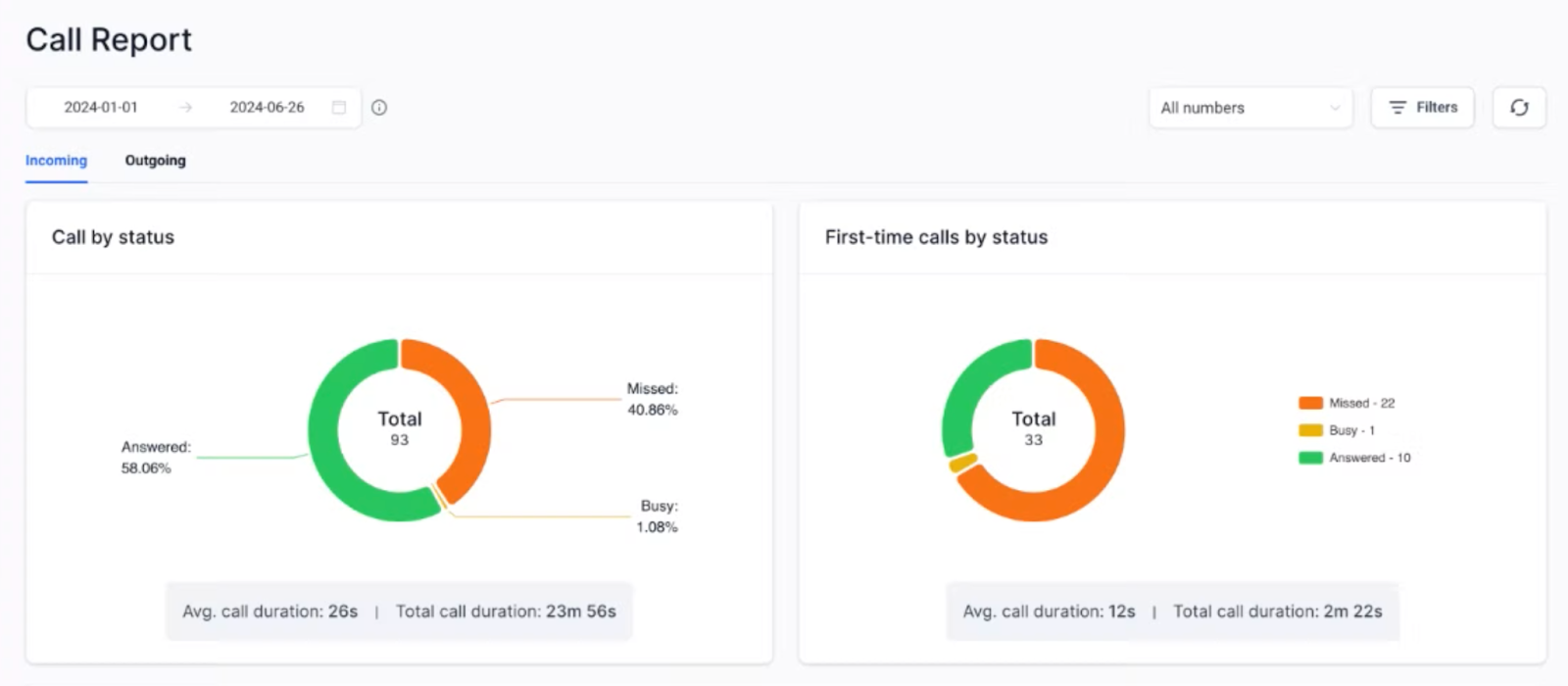
Missed Call Text Back ROI Calculator: How Much Money Are You Losing?
Listen, I’m not gonna rehash all that stuff about GoHighLevel’s Missed Call Text Back feature. You already know what it does. (And if you’ve read this far, you’re probably thinking “Yeah dude, I get it.”)
So let’s just talk straight about the money here.
What’s a typical job/service worth to you… $200? (I mean, we both know it’s probably more, but let’s keep it stupid simple and use the example from earlier.)
Check this out – even if this thing only grabs ONE extra customer a month that would’ve ghosted you… that’s an extra $200 in your pocket. Every. Single. Month.
GoHighLevel runs $97 a month.
Do the math with me real quick:
- You make: $200
- You spend: $97
- You pocket: $103
That’s a 106% ROI. And that’s if you only convert ONE missed call per month. (Spoiler alert: you can do a lot better than that.) You only need to convert ONE missed call per month to more than double your investment in GoHighLevel. Woah.
Now, what if you have products or services that cost more than $200? Well, you can imagine how big these numbers can get… Not to mention the other 100 revenue-generating features of GoHighLevel that can help automate and streamline your business.
Look, I could go on about all the other cool stuff GoHighLevel does – the AI stuff, the marketing tools, blah blah blah. But let’s save that for another day. Right now, all you need to know is this one feature can straight-up 5, 10 or even 100X your investment.
ROI Calculator
Results:
Potential Revenue from Missed Calls: $
Highlevel Investment: $
Net ROI (in $): $
ROI Percentage: %
How Much Are Missed Calls Costing You?
Just 4 quick numbers to see exactly how much money you’re leaving on the table:
- Average customer value (how much a typical customer’s worth to you)
- Missed calls per month (be honest with yourself here… no judgment)
- Your close rate (how many leads typically turn into paying customers)
- Hit calculate and…
BAM! See your missed revenue and potential ROI in black and white.
Here’s what you need to do right now:
- Click here to grab your free 14-day free trial through my affiliate link (it costs the same)
- Hit me up through the contact form on this website letting me know you’ve signed up using my link
- We’ll jump on a call and I’ll personally help you set this bad boy up
Why am I doing this? Because I want you to be profitable before you ever pay your first $97 to GoHighLevel. And trust me – 14 days is plenty of time to see this thing work its magic.
That’s it. No pressure. But also… don’t be the guy still manually calling back leads while your competition is chillin’ on the beach letting automation do the heavy lifting.
Just saying. 🤷♂️
How to Setup GoHighLevel Missed Call Text-Back (Basic)
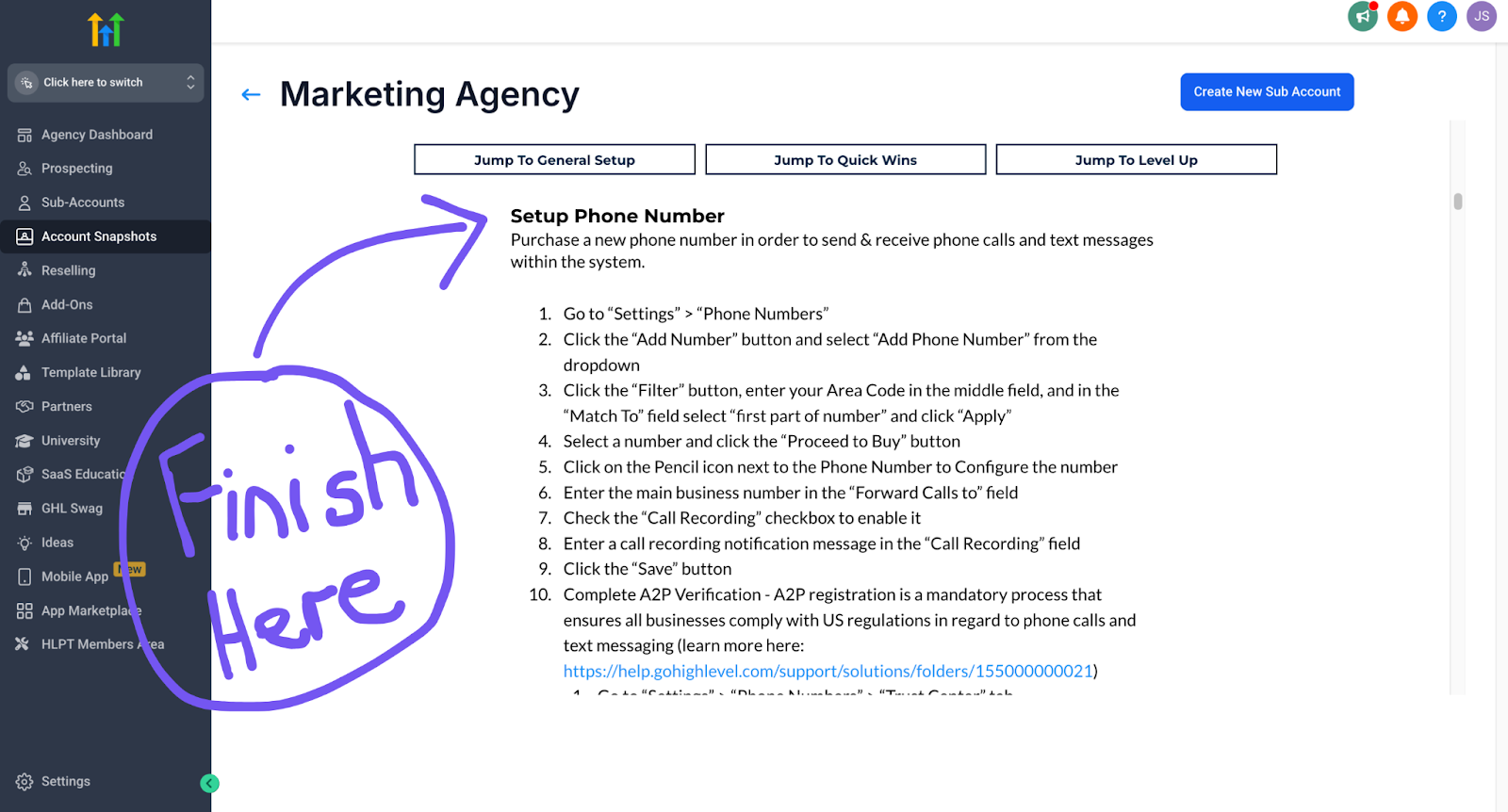
Let me walk you through this step-by-step. No fluff, just exactly what you need to do to start catching those missed calls (don’t mind my incredible drawing skills).
Step 1: Get Started
- Click here to grab your 14-day free trial
- Once you’re in, go to “Account Snapshots” > “Snapshot Templates”
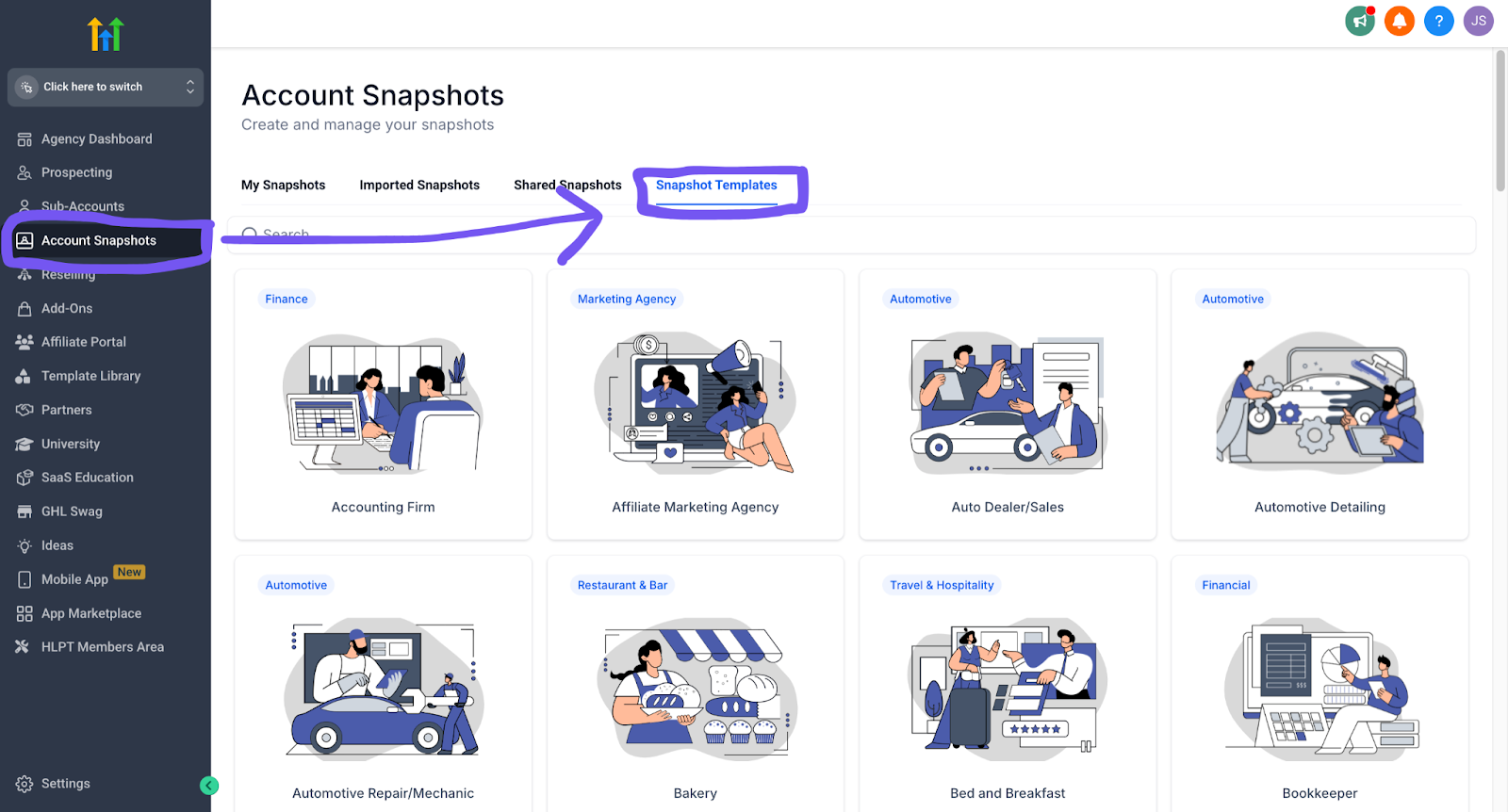
- Type in your business and find your business snapshot
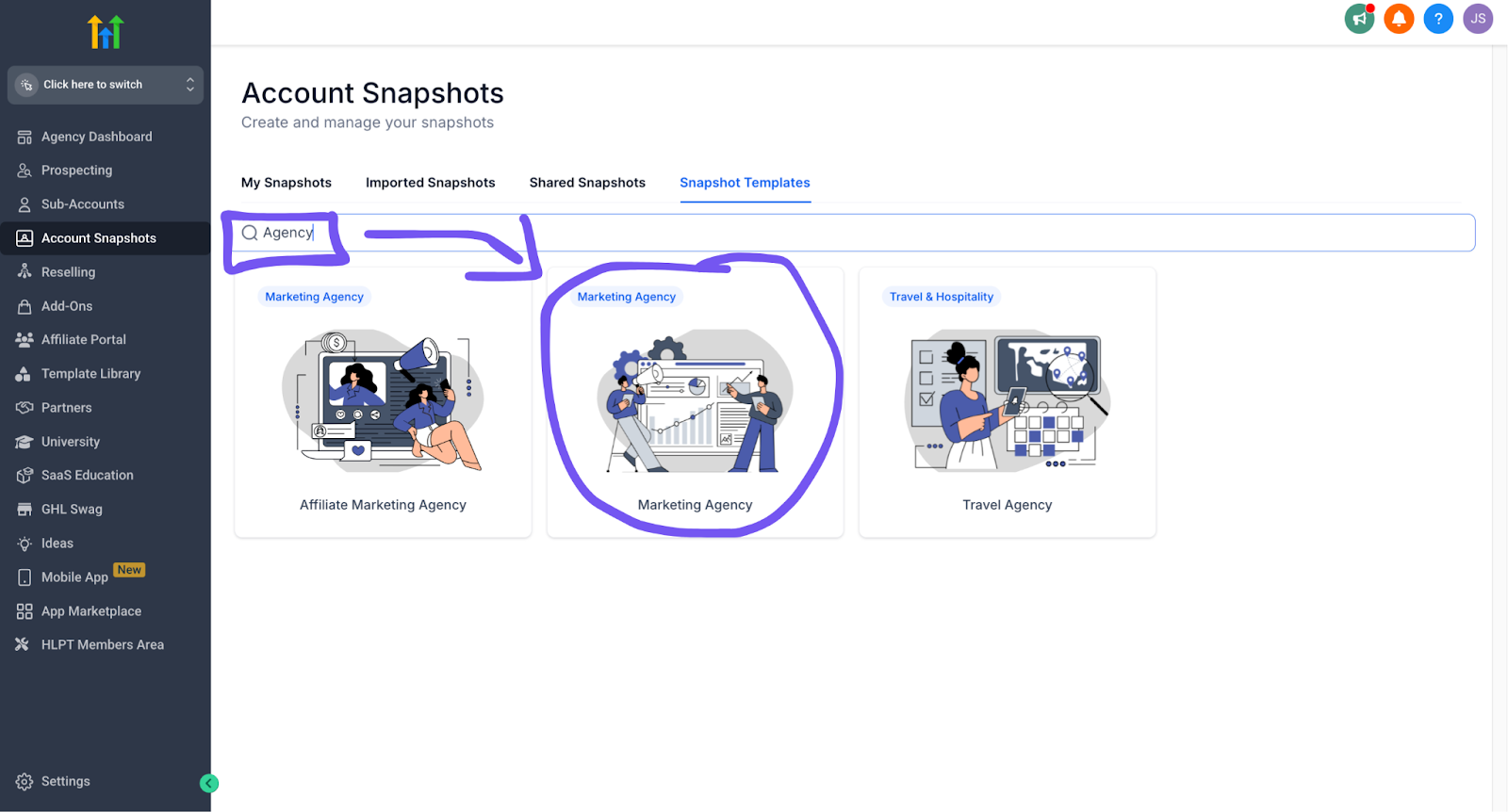
(If you can’t find your business here don’t stress, the setup guide is the same for every snapshot template – so if you can’t find your business or industry just search “Agency” and click on that snapshot and proceed below)
- Start at “General Account Setup”
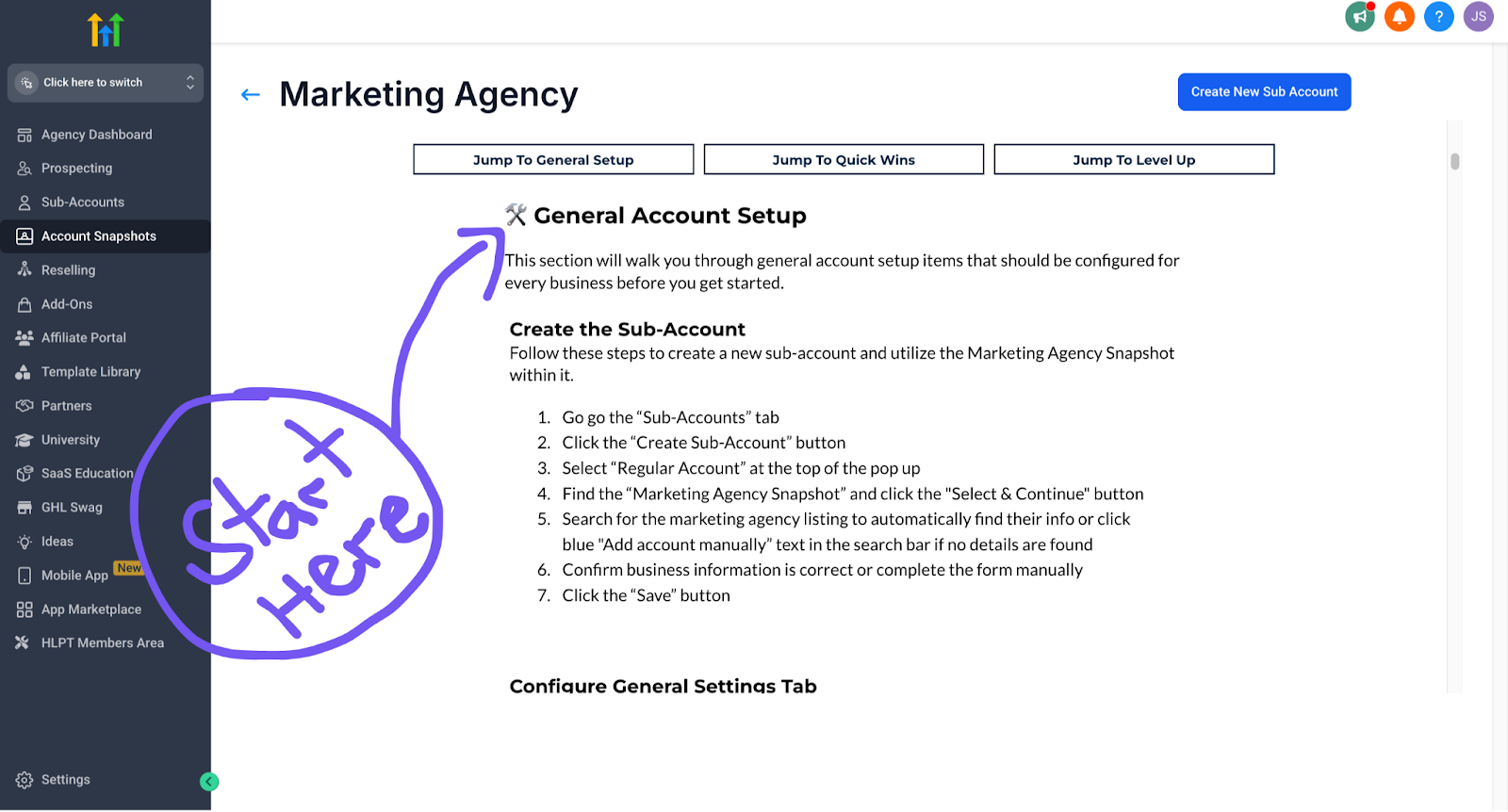
- Stop at “Setup Phone Number” (we’ll handle the rest below)
Step 2: Setup Missed Call Text Back
- Go to your sub-account
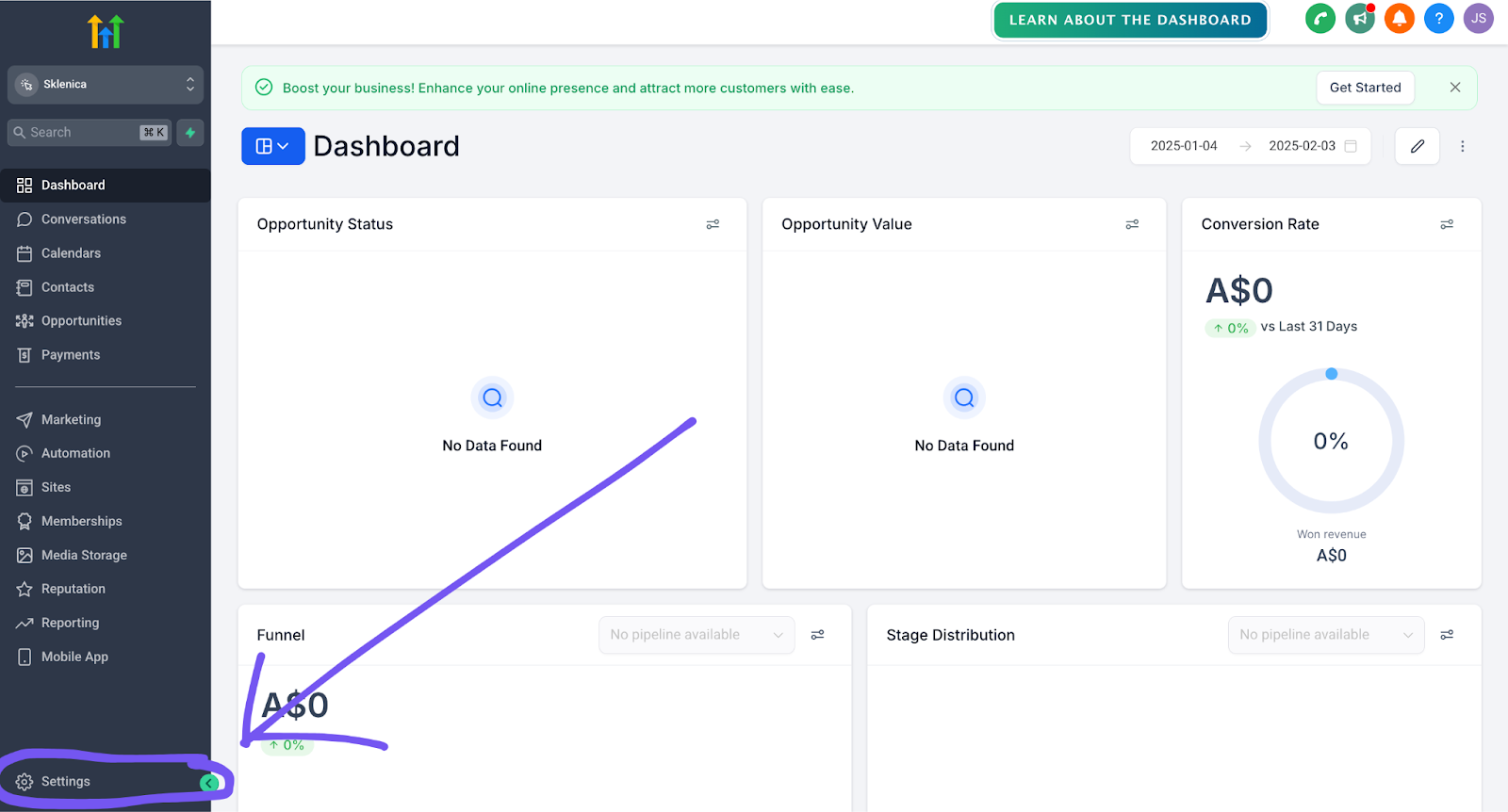
- Hit “Settings” (bottom left corner)
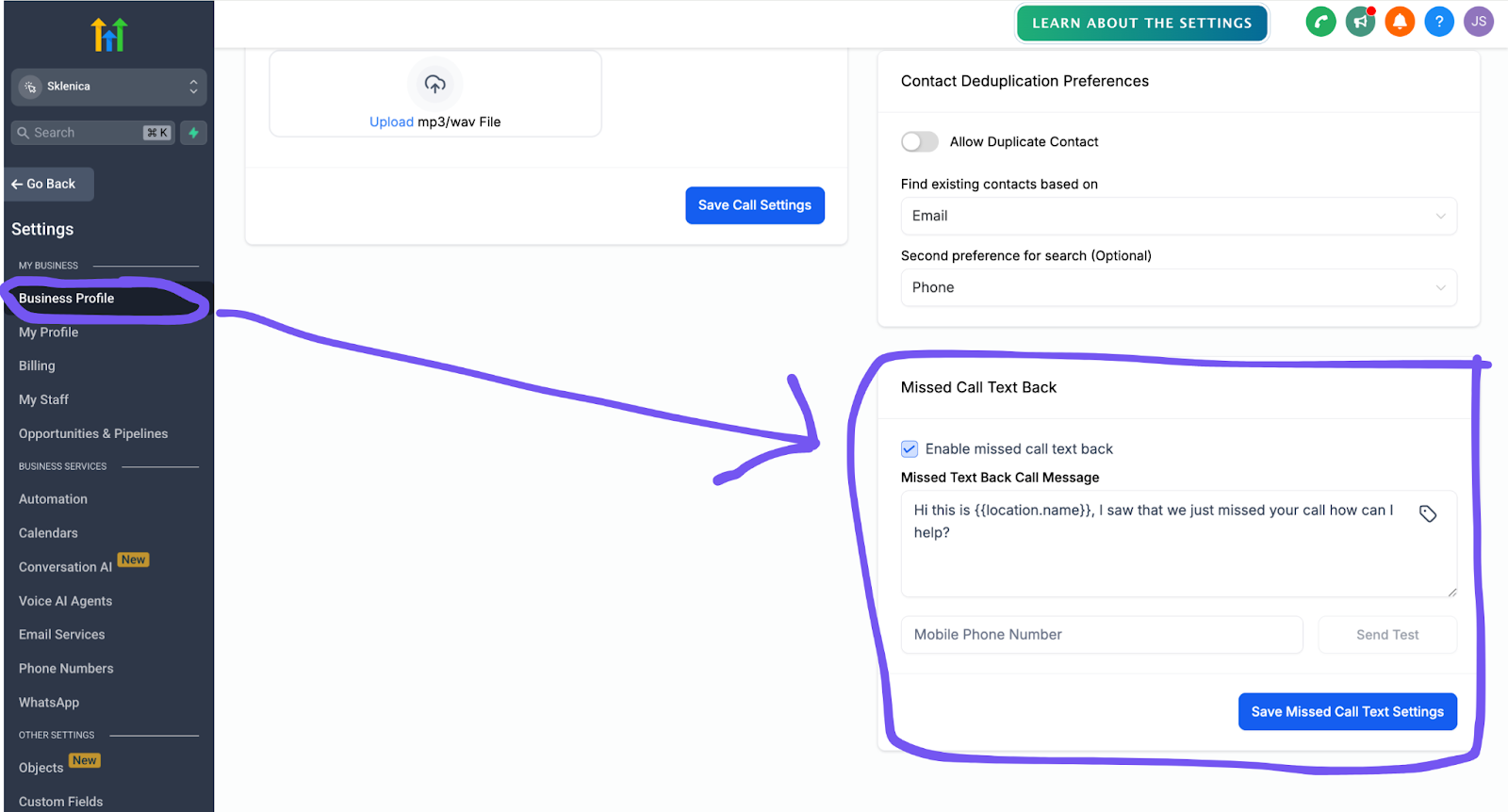
- Click “Business Profile” on the left
- Scroll all the way down to “Missed Call Text-Back”
- Need the full walkthrough? Click this link for detailed tutorials.
Step 3: Write Your Message
- Check that “Enable missed call text back” box to turn it on
- Write your message (Keep it simple – we’ll get fancy later)
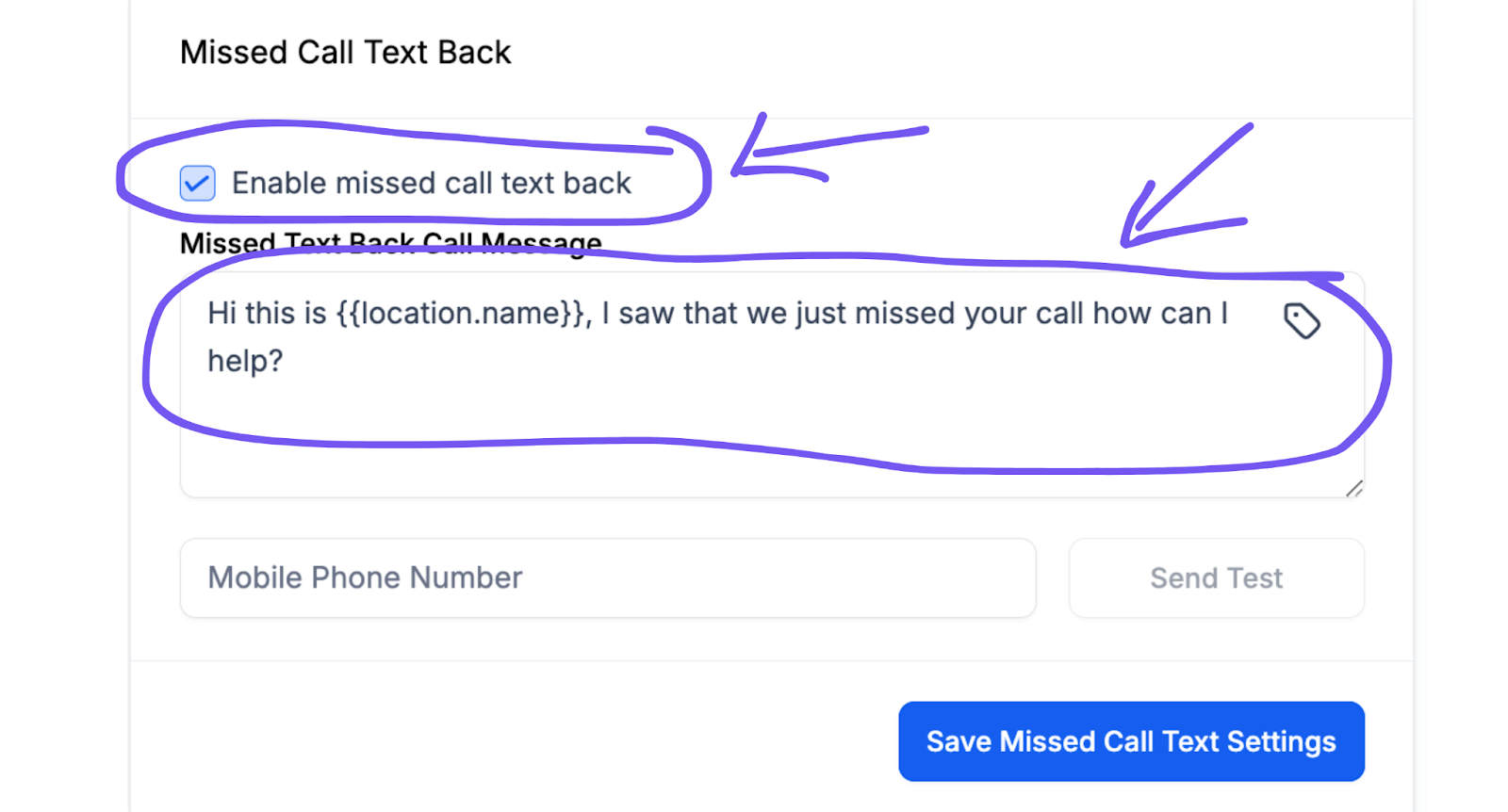
- Want to add custom field stuff? Click the tag icon for things like:
- Calendar links (so they can book right away)
– Really the only one you could use for the Missed Call Text Back
- Calendar links (so they can book right away)
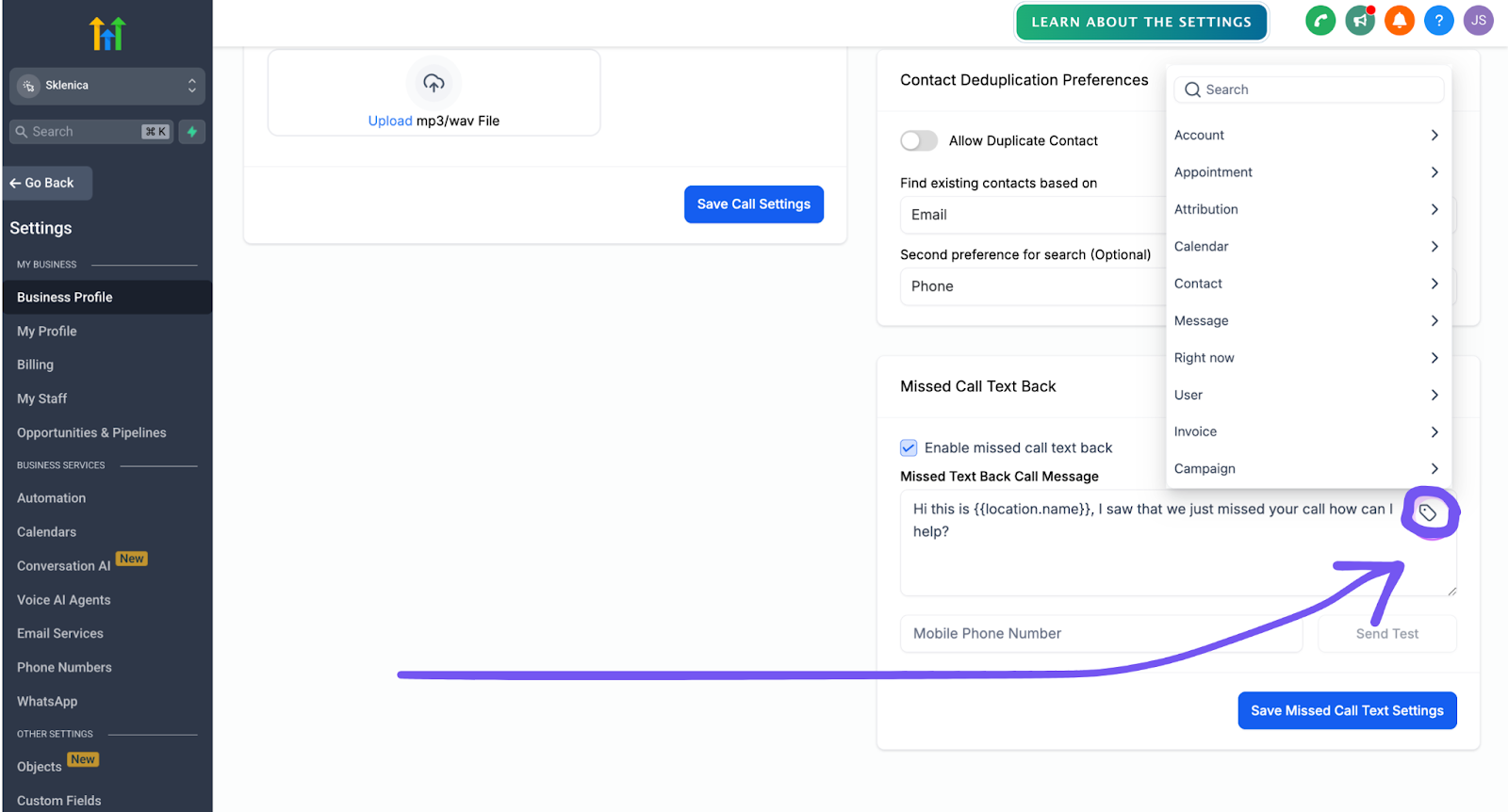
HOLD UP – IMPORTANT STUFF: Here’s the thing about getting fancy with custom fields… Most people calling you are NOT already in your system yet. So if you try using their name or other personal stuff, it’s gonna look weird when it fails. My advice? KISS (Keep it stupid-simple). Stick to one of those basic templates we talked about earlier.
Step 4: Test That Thing
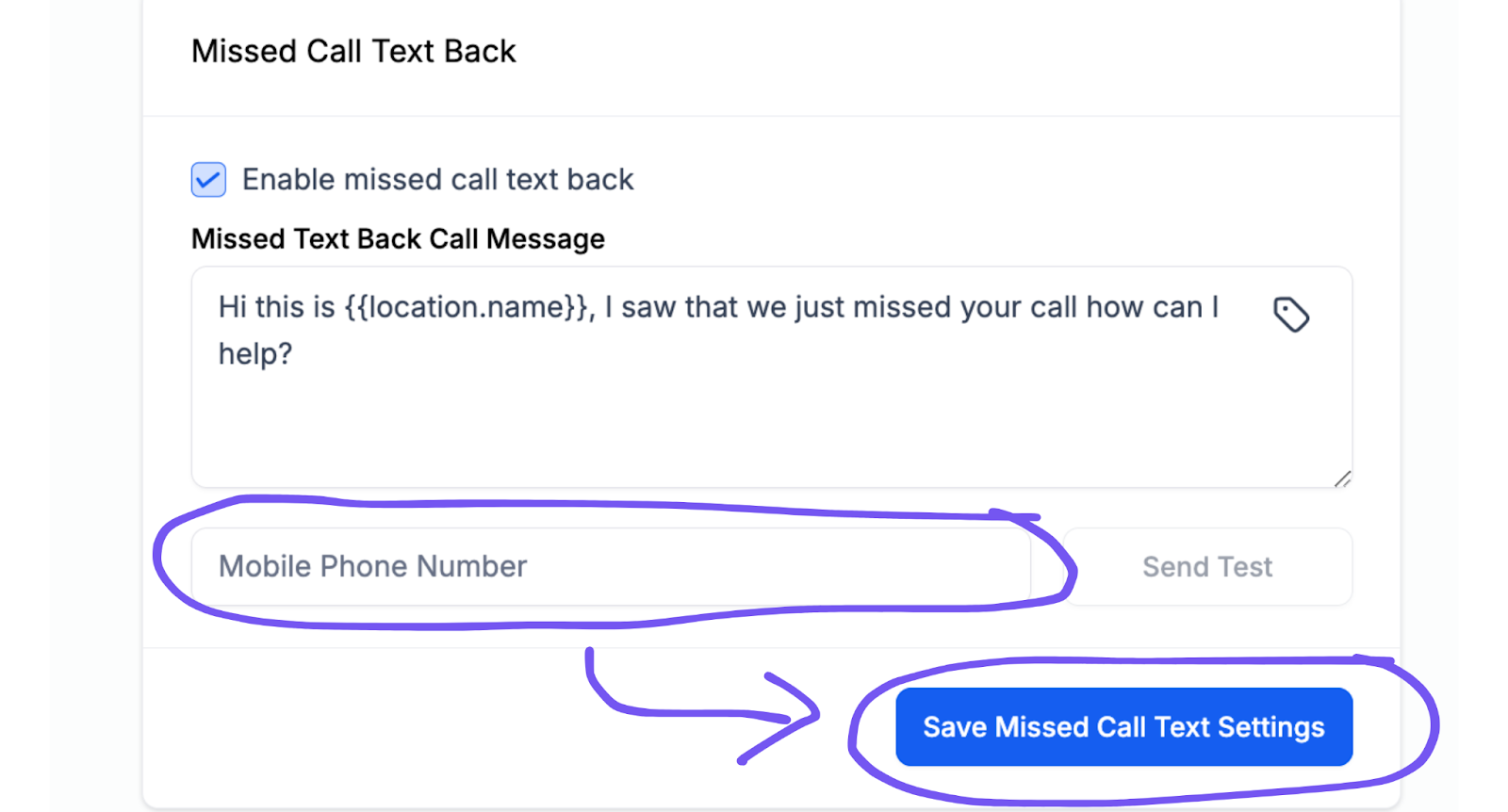
- Drop your cell number in there
- Hit “Send Test”
- Like what you see? Make sure you hit “Save Missed Call Text Settings”
Step 5: Get The Lead Connector Mobile App
You’re gonna want this on your phone. You can manage and respond to everything from your pocket, on the go.
- iPhone user? Click here
- Android user? Click here
(Quick side note: They’ve got this fancy option where you can get your own branded app in the app store. Yeah, like YOUR COMPANY NAME right there next to Instagram. Pretty baller. Not necessary, but if you want to flex on your competition, check it out here. The greylabel Lead Connector app above works just fine though.)
Click here for more info about the mobile app options.
Step 6: Connect Google Business (Do this step if your business receives calls through Google Business Profile):
- Hit Settings > Integrations
- Sign into your Google account
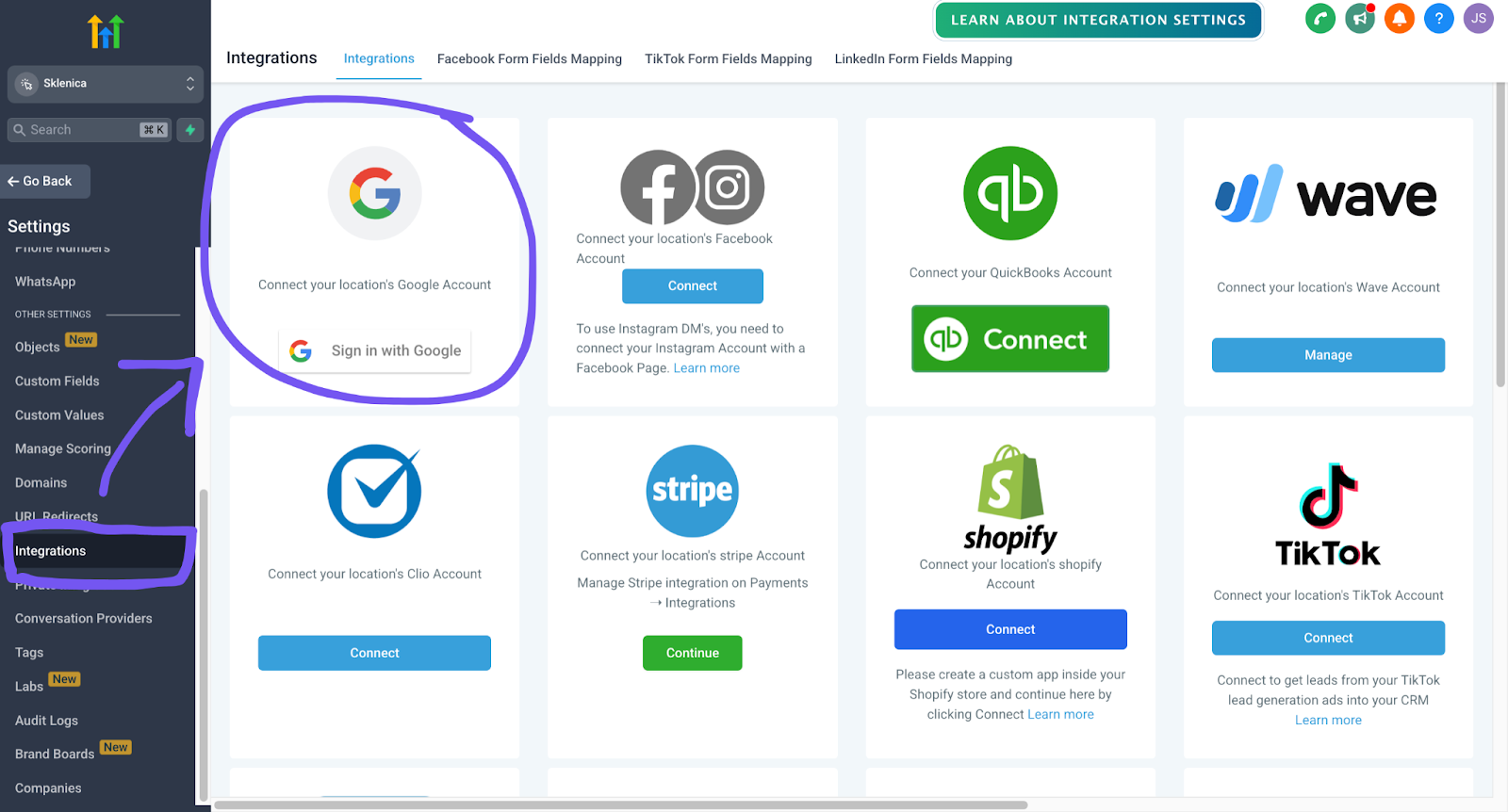
- When your Google account is signed in you’ll see an option to connect your GBP
- Press “Connect”
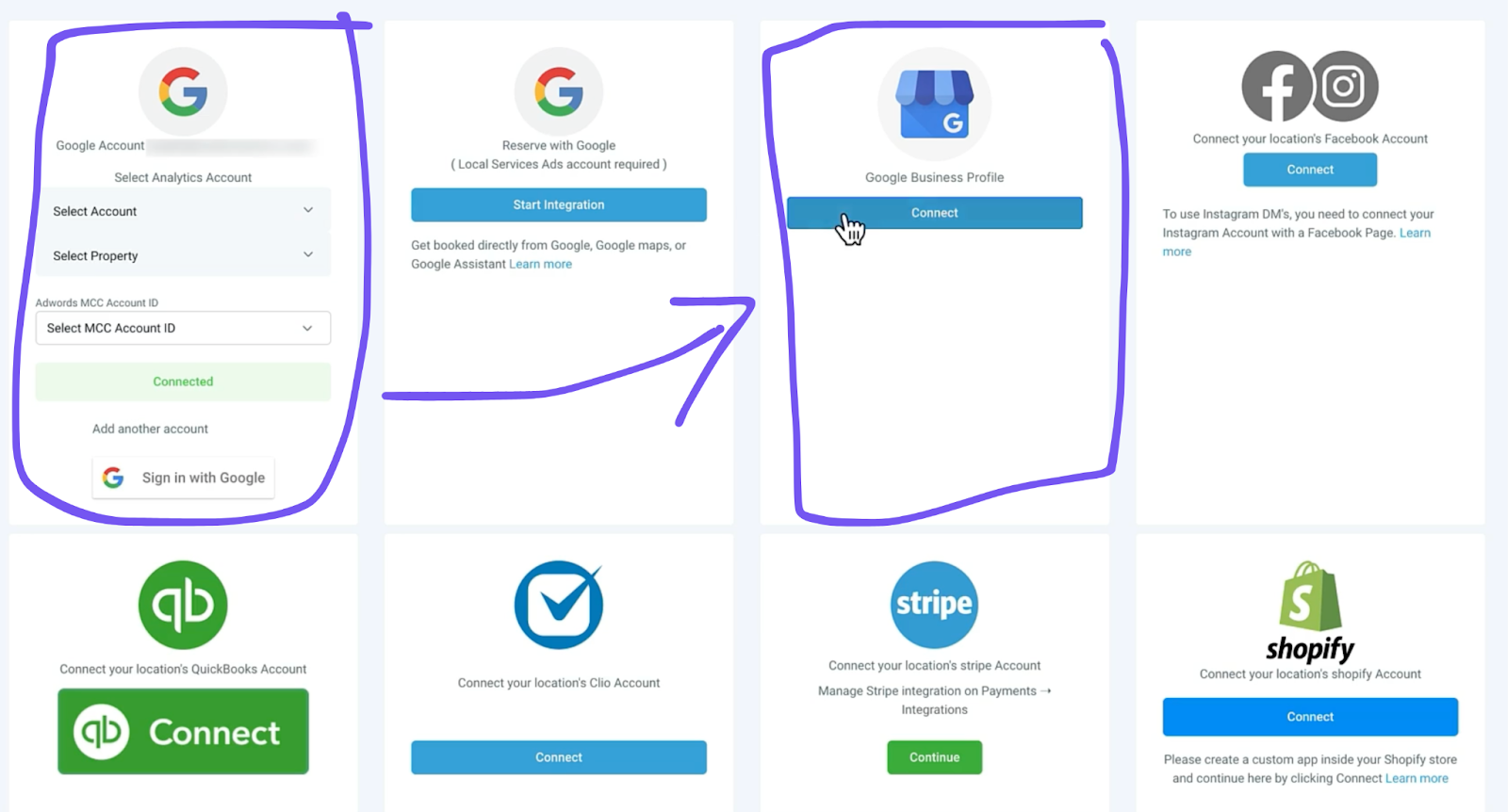
- Flip that GBP call tracking toggle ON when prompted then press “Connect”
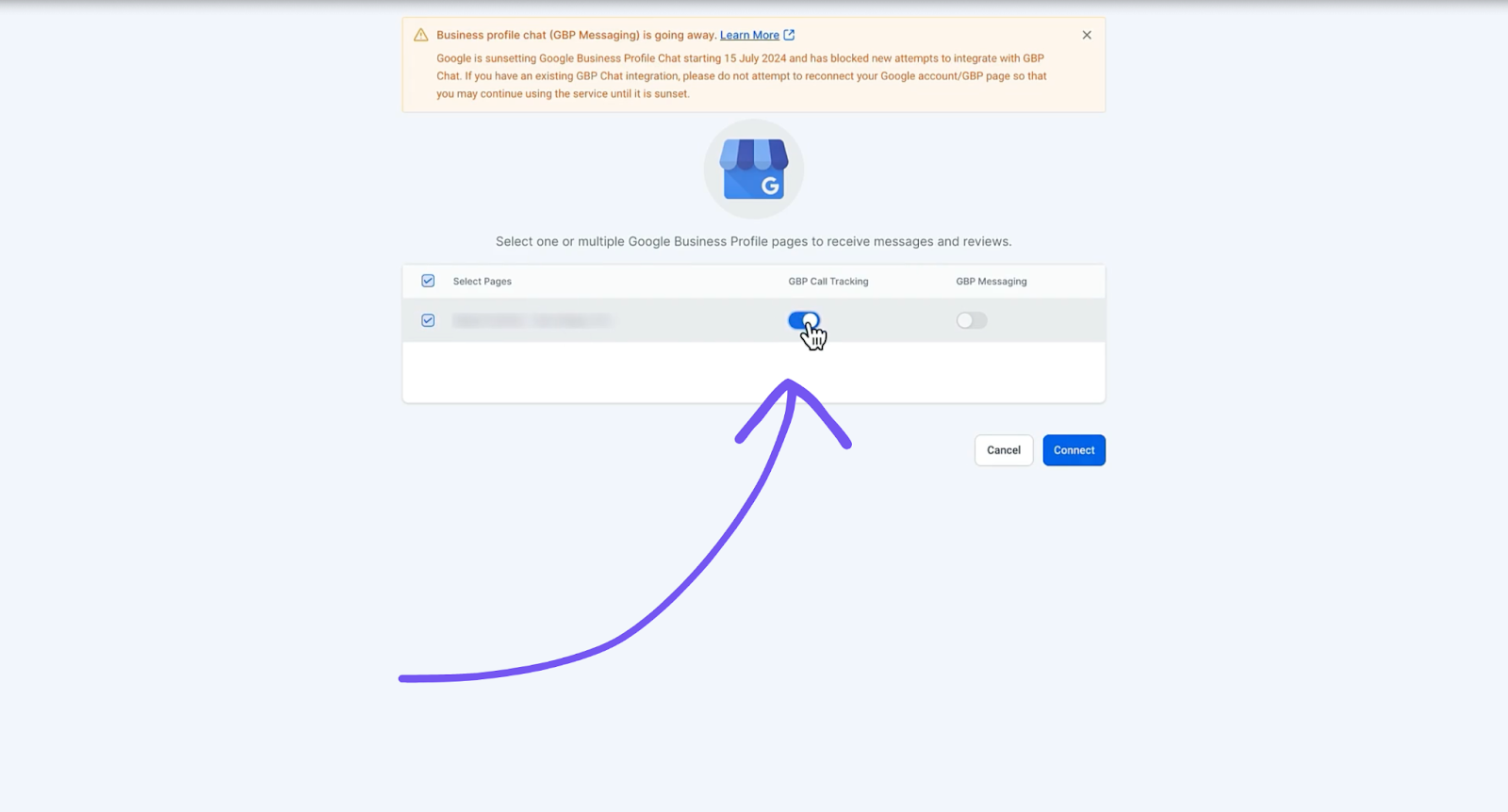
- This is what you’ll see when it’s connected (yay)
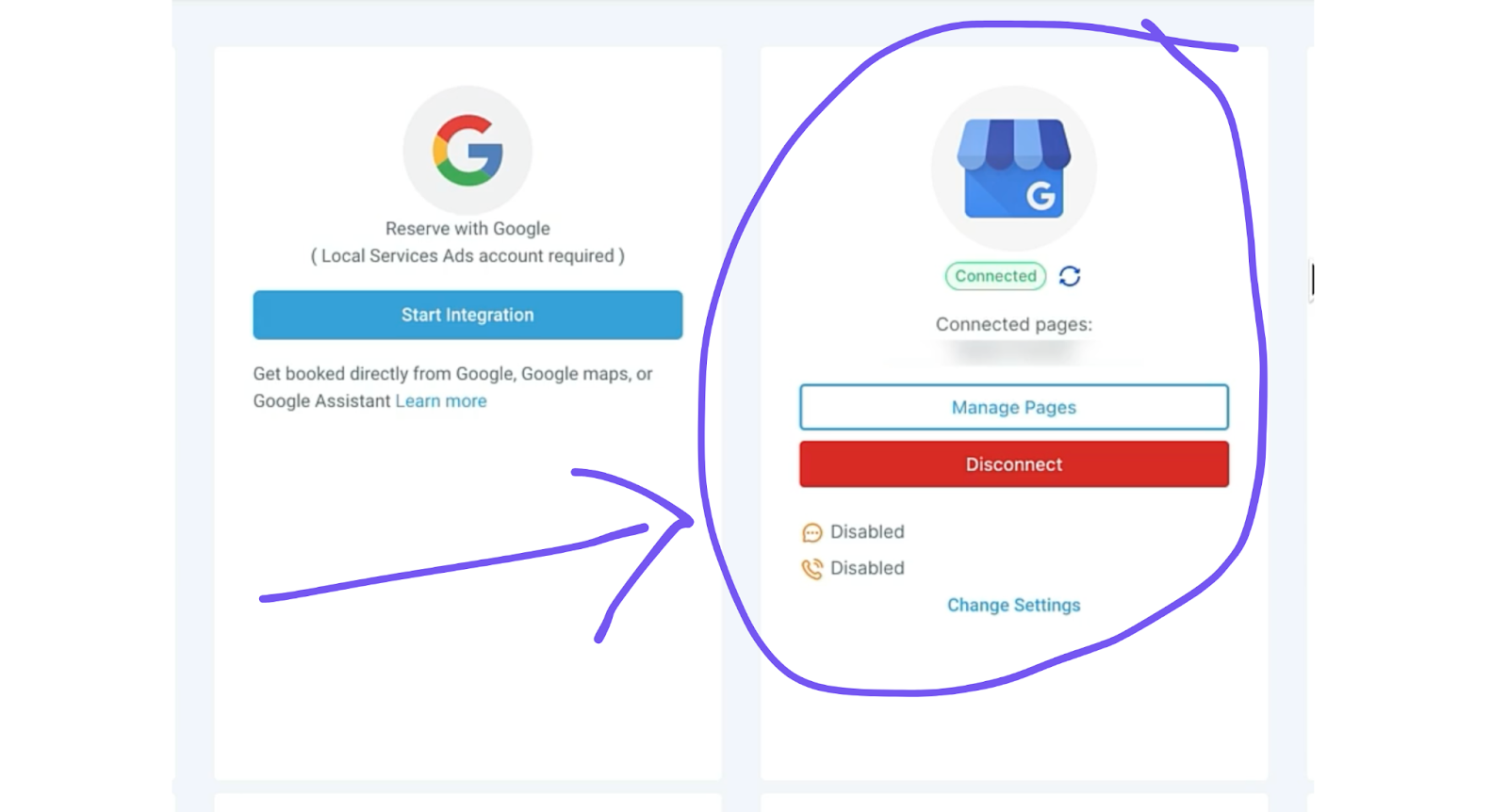
And boom. That’s it. You’re ready to start catching leads that used to slip through your fingers.
Pro Tips:
- Test it from someone else’s phone to catch any weirdness
- Want to stop repeat messages to the same caller? Check out the advanced setup guide below
- Need help setting up? If you signed up through my link, hit my contact form and we’ll jump on a call to get you rolling (free)
Now go make some money. 🔧
How to Setup GoHighLevel Missed Call Text-Back (Advanced)
If you’re still reading, you’re probably wanting to get the most out of this system. So let me show you how you can make this system even better (more awesome drawings coming your way)
Here’s the deal: The basic setup is great, but there’s one annoying thing it does – it’ll keep sending the same text over and over if someone calls multiple times. Pretty annoying, right?
But check this out… there’s a workflow recipe that fixes this AND gives you way more control. Here’s how to set it up:
Step 1: Find The Recipe
- Hit up your sub-account
- Click “Automation”
- Look for “Missed Call Text-Back” recipe
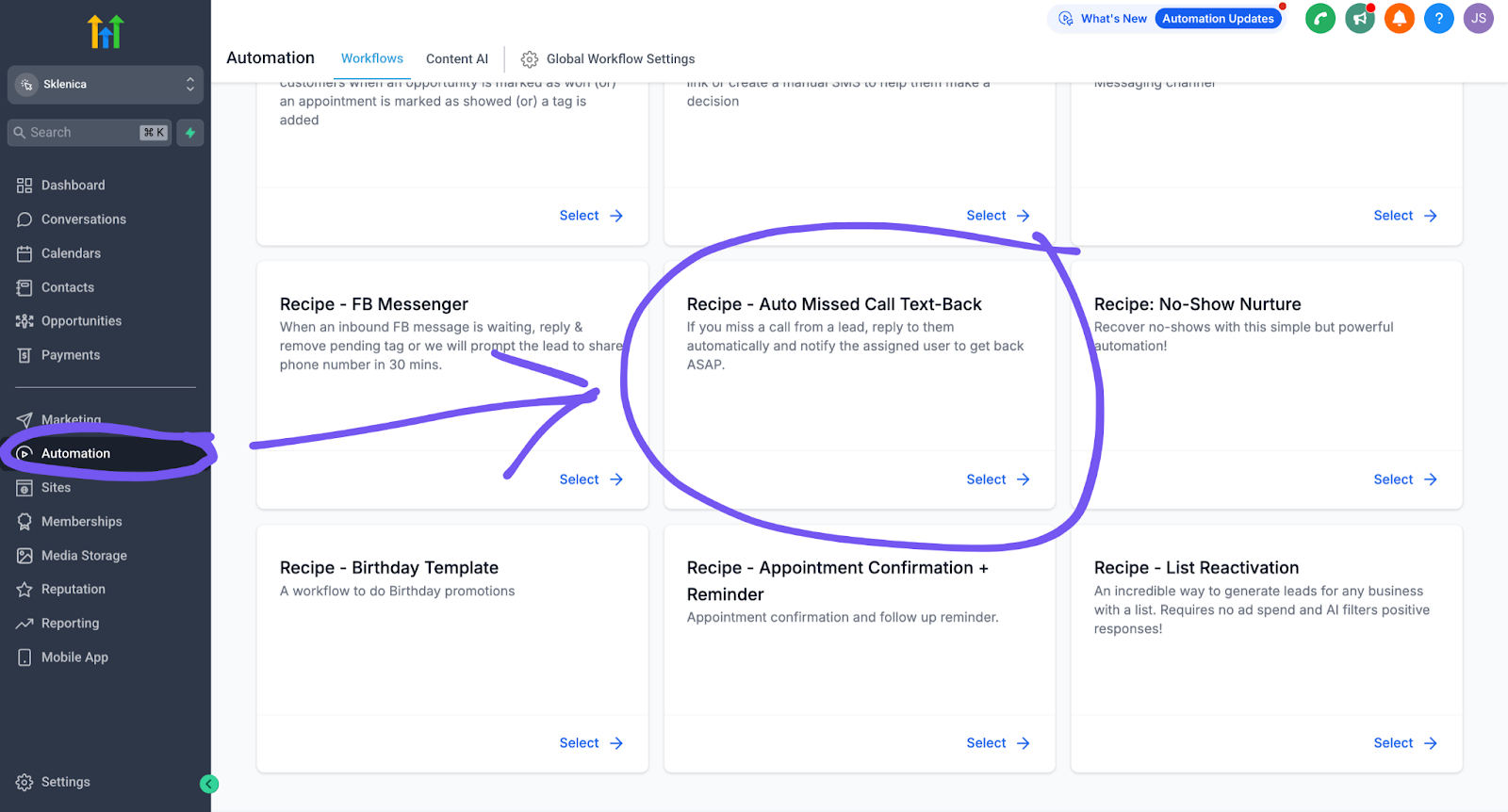
Step 2: Set Your Trigger
- It’ll catch missed calls, busy signals, and voicemails
- Pro tip: You can add more triggers if you want (they’re in that right-hand menu)
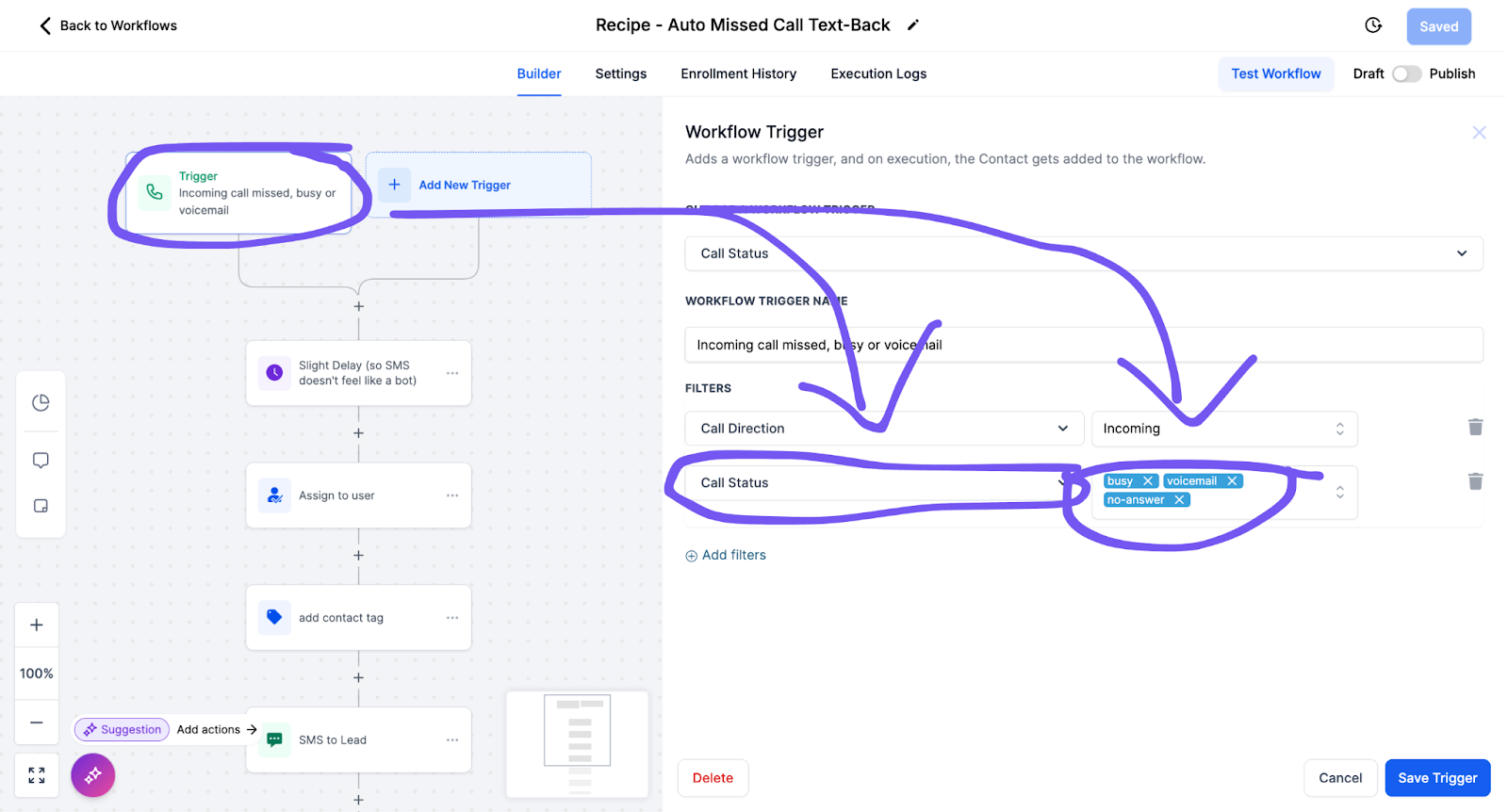
Step 3: The Money Settings
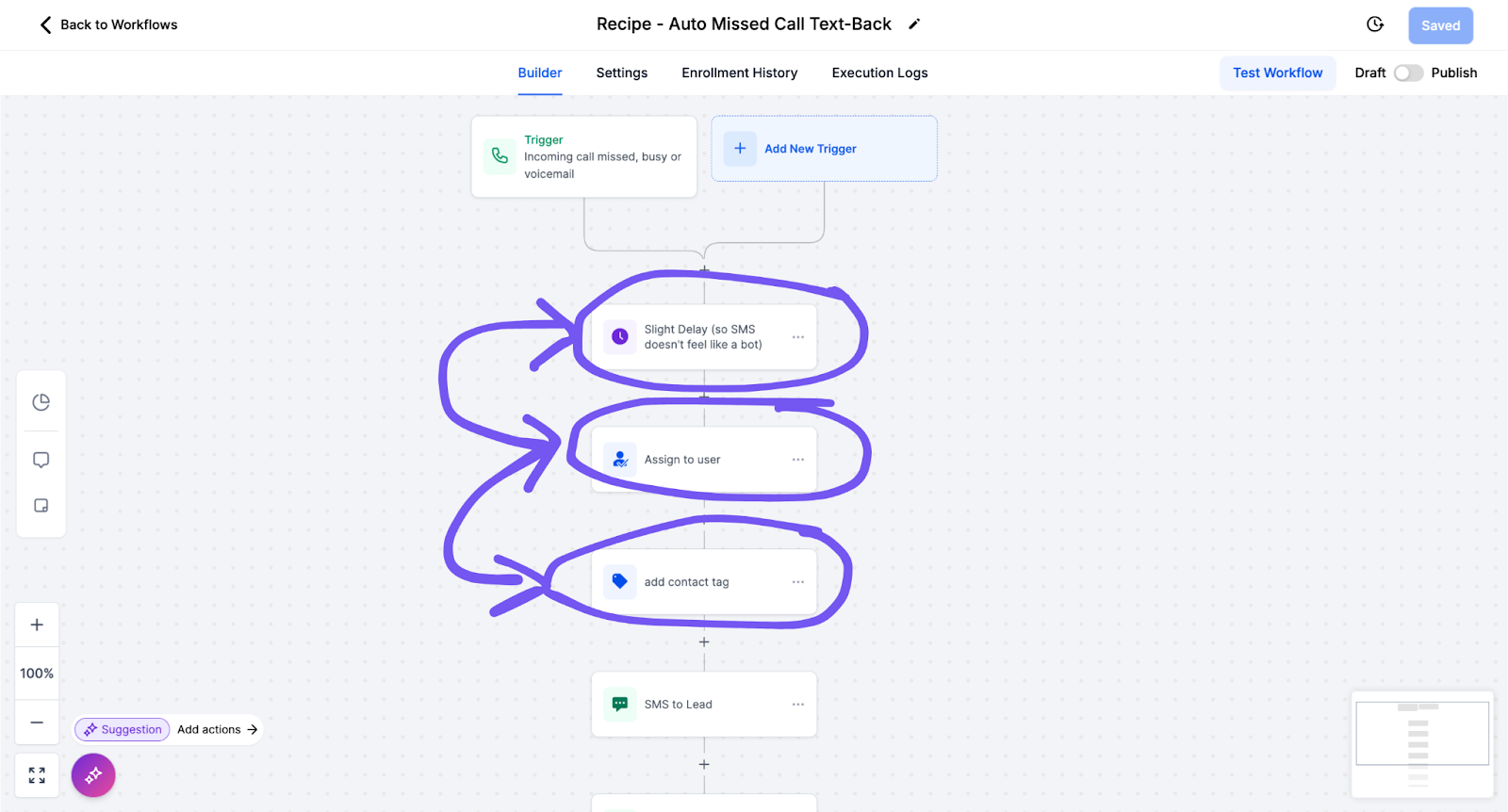
- Set your delay (it’s set at 0.2 minutes so it seems more human)
- Click “Assign to user” and pick the team member that gets the calls, or choose yourself if it’s you (choose from the dropdown)
- Click “add contact tag” and give these contacts a tag (name it anything (it’s easier to find and organise your list later))
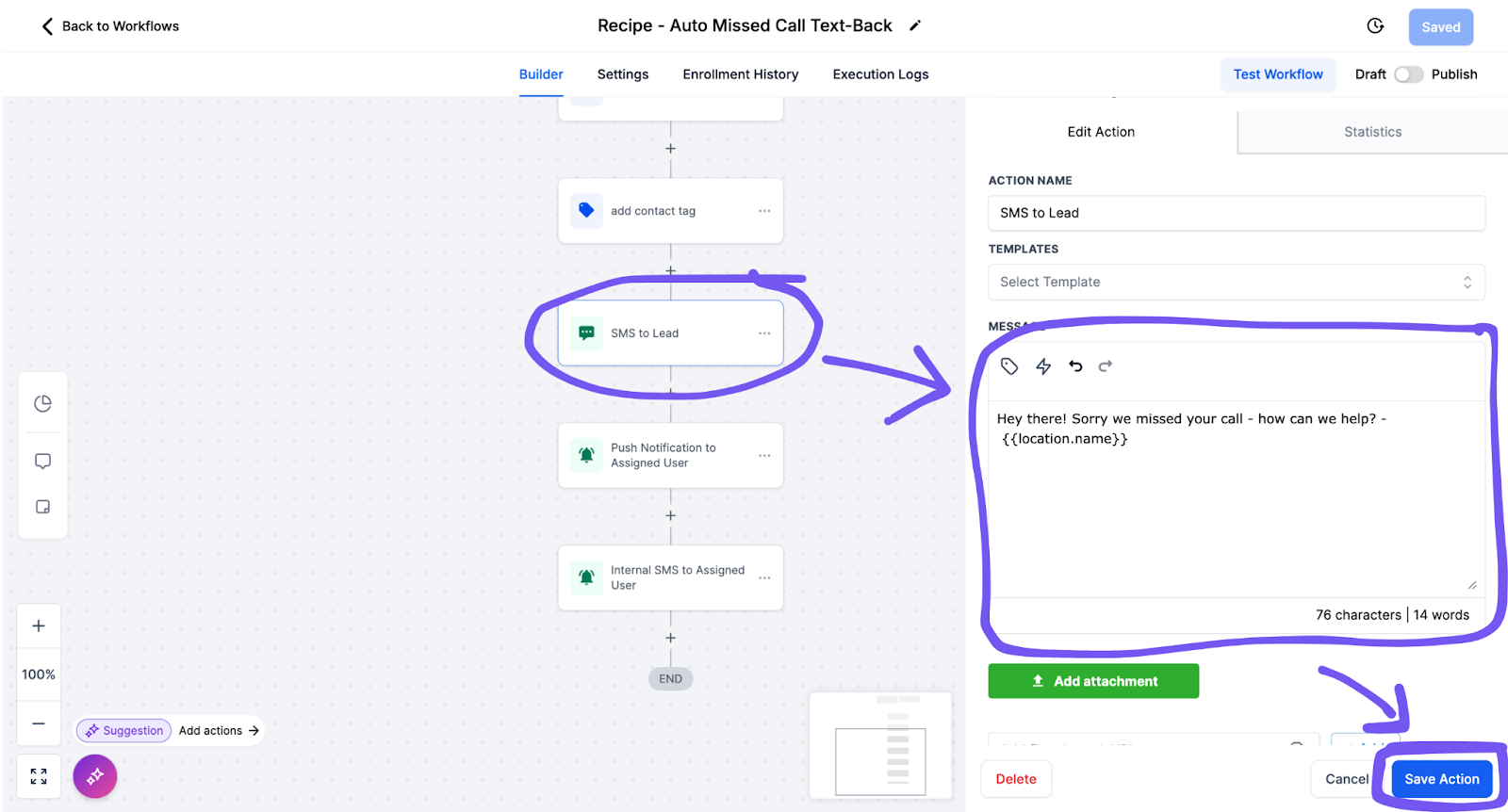
Step 4: The Fun Part
- Customize your text message
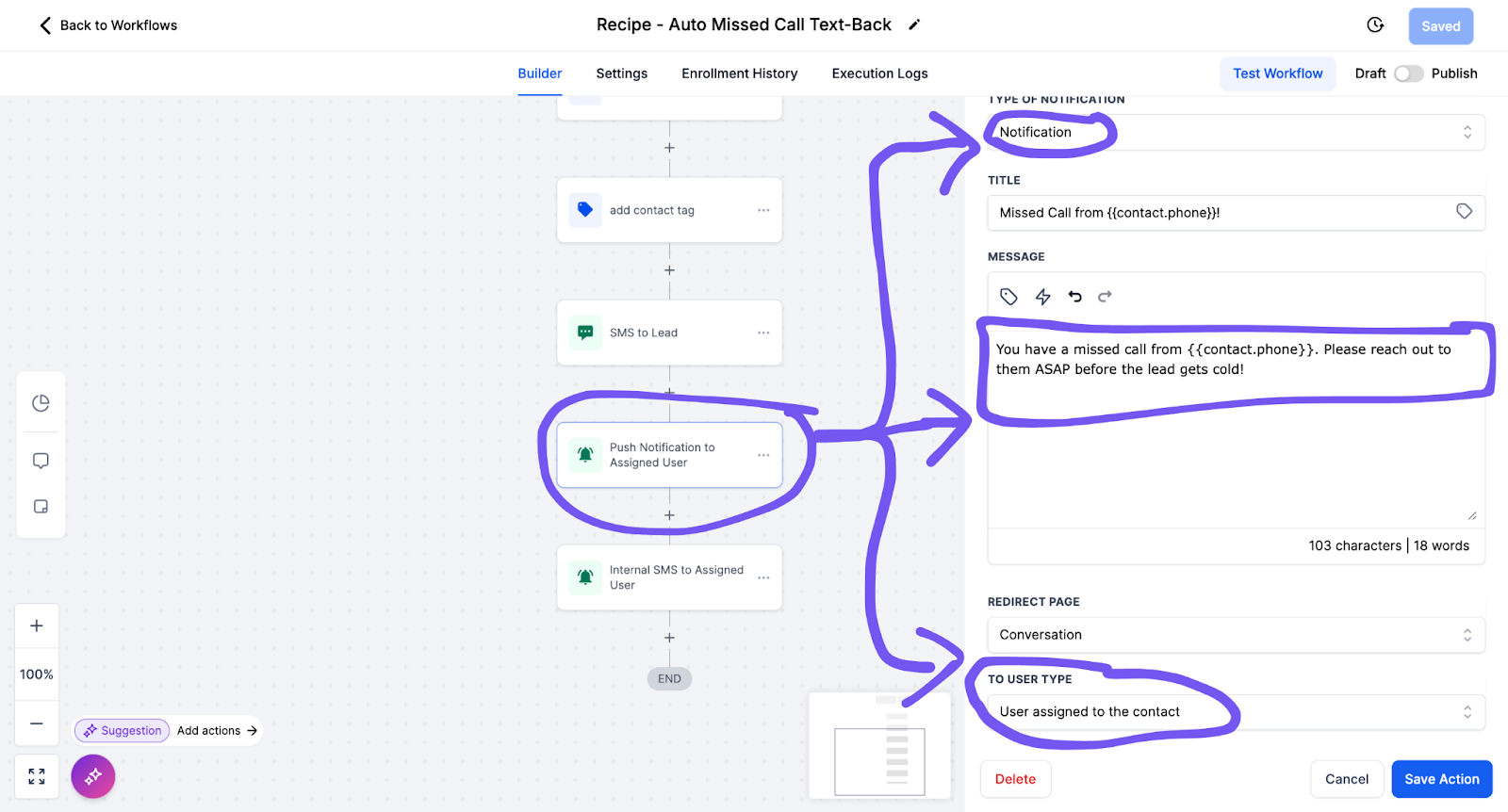
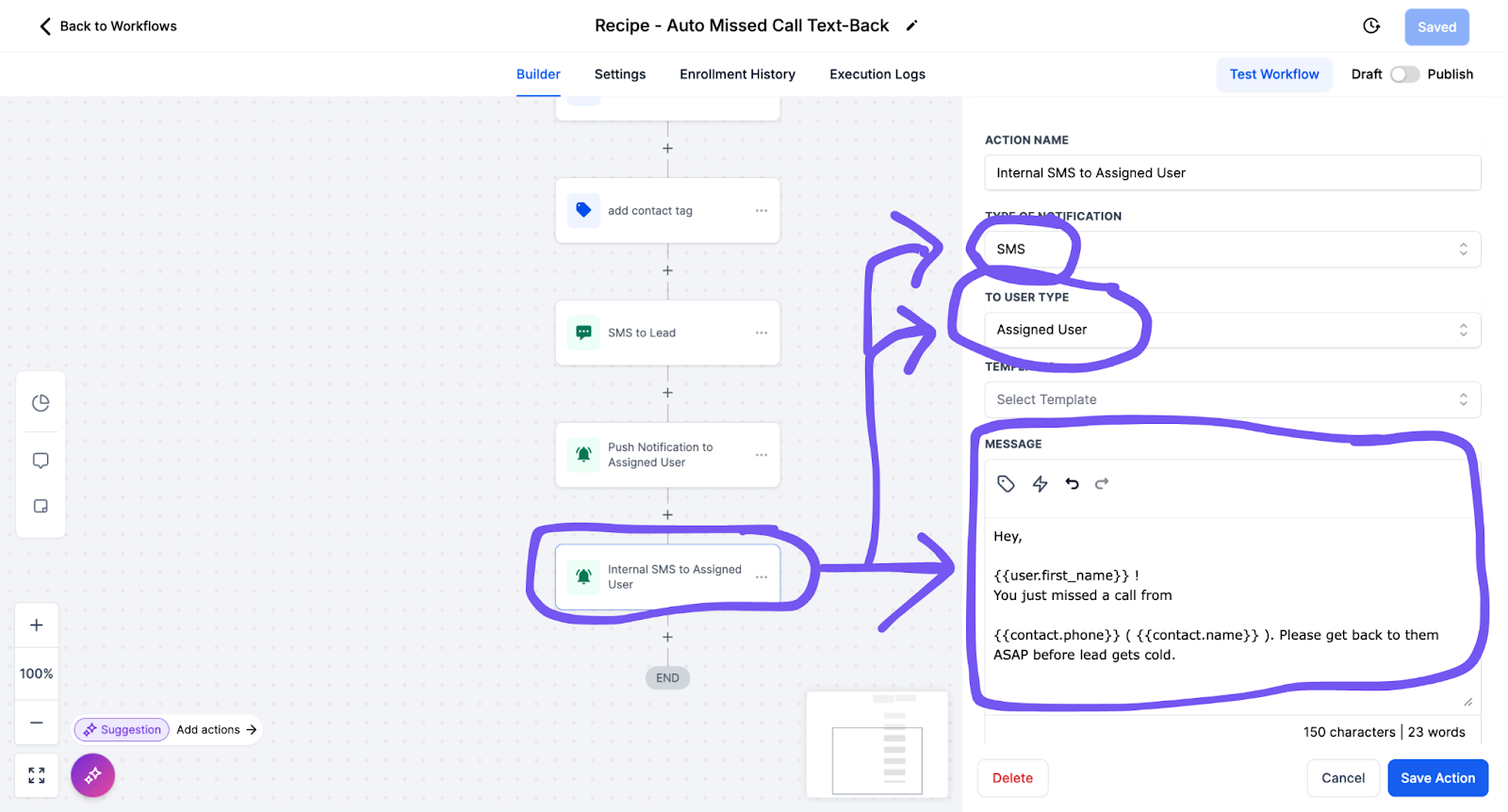
Step 5: Get Notified
- Set up notifications to your team
- Add SMS alerts (because sometimes people miss notifications)
Step 6: The Most Important Part (Don’t Skip This)
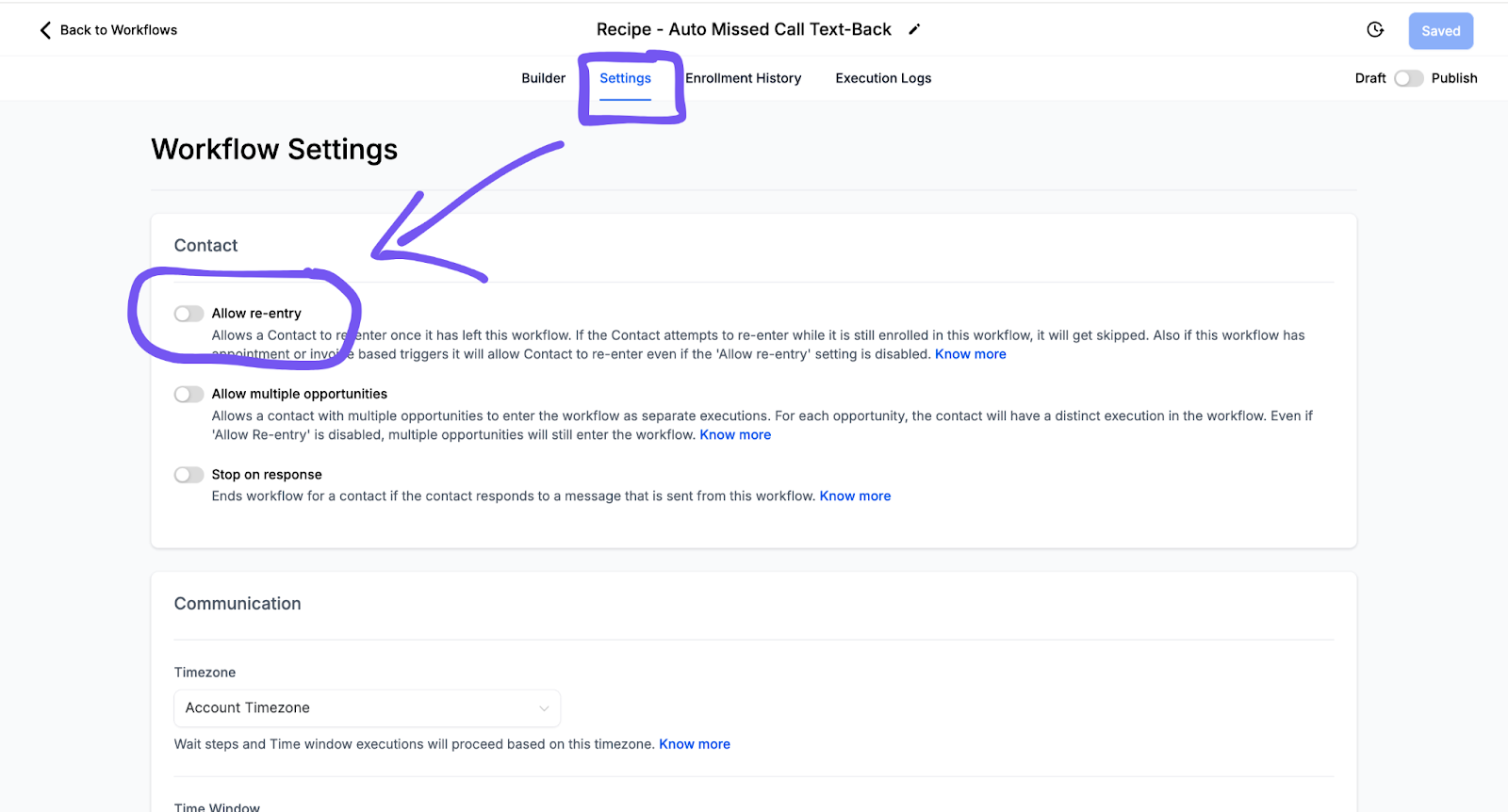
- Hit “Settings” at the top
- Find “Allow Re-Entry” and turn that bad boy OFF
- This is what stops the annoying repeat texts
Step 7: Final Step
- Hit publish (top right corner)
- Save that bad boy
- You’re golden
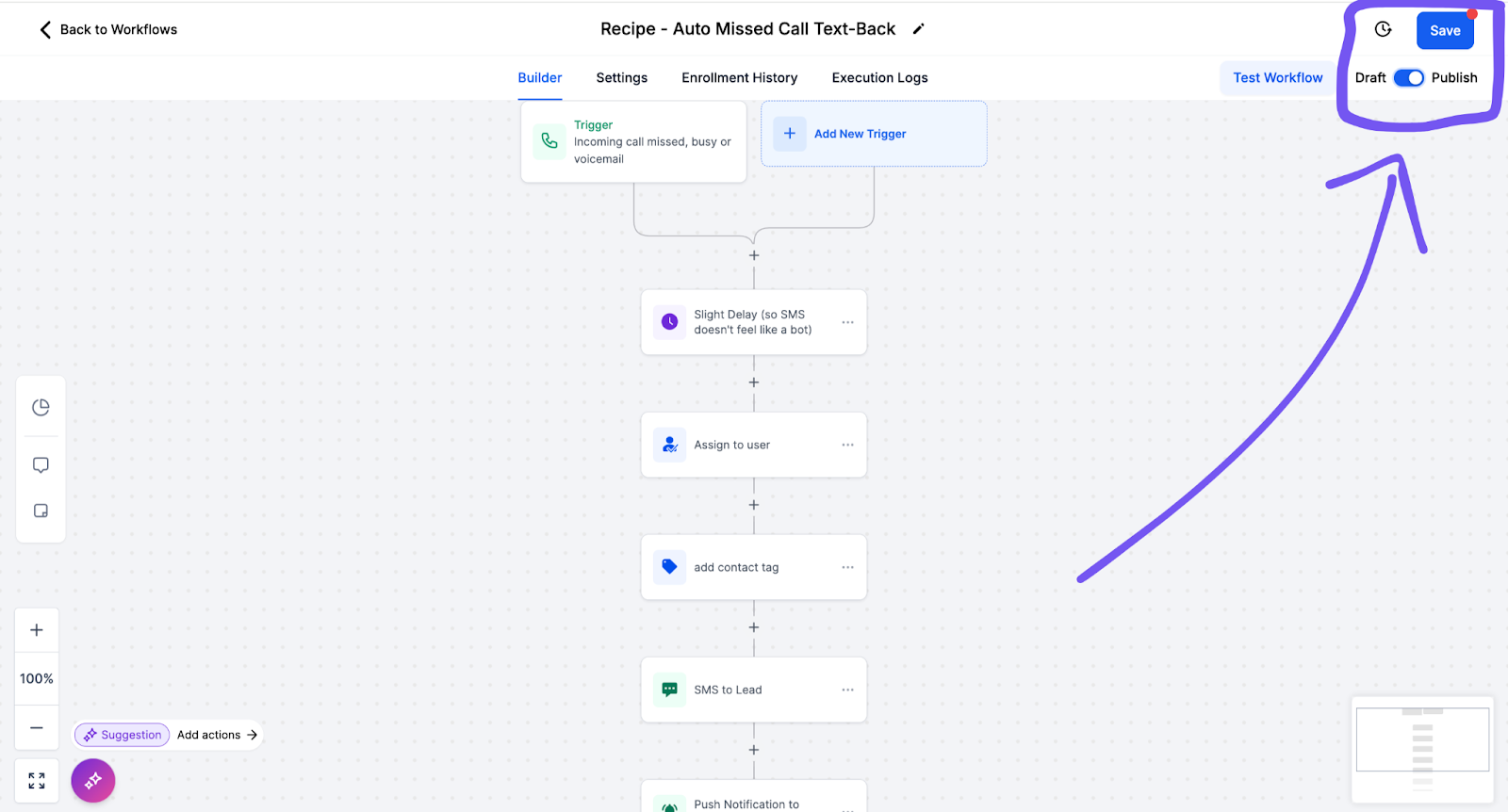
Pro Tip: Test the notifications are working properly. They keep your leads hot because someone on your team can be notified immediately and jump on that callback fast.
Just remember – this is the advanced setup. If you’re feeling overwhelmed, stick with the basic version we covered earlier. You can always come back to this later when you’re ready to level up.
Get all your text message templates done for you, for free. Just fill in the form below and tell me your name and where to send it:
Conclusion
Right, we’ve covered a lot of ground here. From the gut-punch stats about missed calls to the dead-simple solution that’s printing money for local businesses.
Here’s the deal: Every minute you’re not capturing those missed calls is another chunk of cash floating right into your competitor’s pocket. We’re talking real money here – urgent requests, weekend inquiries, those sweet premium-rate gigs that make all the difference.
But here’s the beautiful part: You can fix this today. Like, right now. Not next quarter. Not when you “get around to it.” Today.
GoHighlevel’s missed call system isn’t just another piece of software – it’s your 24/7 digital employee that never calls in sick, never takes a lunch break, and costs less than a day’s minimum wage.
- You could be losing $8k+ monthly in missed calls (ouch)
- Setup takes 10 minutes (max)
- One customer pays for the entire system
Look, I’ve laid it all out for you. The templates. The setup guide. The whole nine yards. All you’ve got to do is take that first step.
Don’t be the business still playing phone tag while your competition is scaling their business on autopilot. Hit this link, grab your 14-day test drive, and let’s turn those missed calls into cold, hard cash.
Your move, boss.